Shopify SEO Basics
Shopify SEO is the process of helping search engines understand your store, product pages, collections, blog posts, images, and site structure so more potential customers can discover your products through organic search. For beginners, the most important SEO work is not advanced technical optimization. It is clear product pages, useful content, descriptive titles, clean URLs, good internal links, image alt text, and a simple store structure.
This beginner-friendly guide explains Shopify SEO basics, including keyword research, homepage SEO, product SEO, collection SEO, blog content, image alt text, internal links, sitemaps, redirects, technical SEO, and common mistakes to avoid when building your first Shopify store.
Shopify SEO is the process of helping search engines understand your store, product pages, collections, blog posts, images, and site structure so more potential customers can discover your products through organic search. For beginners, the most important SEO work is not advanced technical optimization. It is clear product pages, useful content, descriptive titles, clean URLs, good internal links, image alt text, and a simple store structure.
This beginner-friendly guide explains Shopify SEO basics, including keyword research, homepage SEO, product SEO, collection SEO, blog content, image alt text, internal links, sitemaps, redirects, technical SEO, and common mistakes to avoid when building your first Shopify store.
Shopify SEO can feel complicated because people often talk about rankings, keywords, backlinks, schema, sitemaps, redirects, canonical tags, robots.txt, Core Web Vitals, and algorithms all at once. For beginners, that is too much too soon.
The practical starting point is simpler: create a store that is easy for customers and search engines to understand.
Shopify already includes several built-in SEO features. Shopify automatically generates sitemap files and robots.txt files, adds canonical tags to help prevent duplicate content issues, and lets you edit search engine listings for important pages such as products, collections, blog posts, and standard pages. But built-in SEO features do not replace good content, useful product pages, organized collections, and a clear site structure.
This guide explains the Shopify SEO basics that matter most before and after launching your store.
Last checked: May 11, 2026. Shopify SEO features, sitemap behavior, robots.txt behavior, theme functionality, search engine guidance, and Google tools can change. Always confirm current details in Shopify’s official Help Center and Google Search Central before making technical SEO changes.

Quick Answer
Shopify SEO starts with a clear store structure, descriptive product and collection pages, useful page titles and meta descriptions, readable URLs, optimized images, internal links, and helpful content that matches what customers search for. Shopify handles some technical SEO automatically, but you still need to write strong content and organize your store well.
Most important for beginners
Clear product pages, organized collections, useful keywords, good titles, and readable content.
Shopify handles automatically
Sitemap files, robots.txt, canonical tags, and basic SEO fields are built into Shopify.
Biggest beginner mistake
Trying advanced SEO tricks before fixing product descriptions, page titles, internal links, and site structure.
If you are new, focus first on pages that directly affect sales: homepage, key collections, best products, about page, policy pages, and helpful beginner content around your products.
What Is Shopify SEO?
Shopify SEO is the process of improving your Shopify store so search engines can discover, crawl, understand, and rank your pages for relevant searches.
For an ecommerce store, SEO usually includes:
- Product page optimization
- Collection page optimization
- Homepage optimization
- Blog and guide content
- Image alt text
- Internal linking
- URL structure
- Meta titles and descriptions
- Redirect management
- Sitemap and indexing checks
- Page speed and mobile usability
- Structured data and theme quality
- Backlinks and brand authority over time
The goal is not only to get traffic. The goal is to attract visitors who are likely to be interested in your products.
How Search Engines Understand Your Store
Search engines use crawlers to discover pages. They analyze page content, links, titles, headings, images, structured data, canonical signals, and other information to understand what the page is about.
For Shopify stores, search engines usually discover pages through:
- Your homepage
- Main navigation links
- Collection links
- Product links
- Blog and guide links
- Internal links inside content
- Your sitemap file
- External links from other websites
Shopify automatically generates a sitemap.xml file containing links to products, primary product images, pages, collections, and blog posts. Shopify also automatically generates robots.txt and canonical tags for stores. These are helpful technical foundations, but they do not make weak pages rank by themselves.
Beginner takeaway: Shopify gives you a technical SEO foundation. Your job is to create clear, useful, well-organized pages that deserve to be found.
Keyword Research for Shopify
Keyword research means understanding what potential customers search for before they buy, compare, or learn about products like yours.
For beginners, keyword research should answer three questions:
- What products are customers searching for?
- What problems or questions do they search before buying?
- What words do they use to compare options?
Types of Shopify keywords
| Keyword type | Example | Best page type |
|---|---|---|
| Product keyword | organic cotton baby blanket | Product page or collection page |
| Collection keyword | minimalist leather wallets | Collection page |
| Problem keyword | best blanket for newborn summer | Blog post or buying guide |
| Comparison keyword | cotton vs bamboo baby blanket | Blog post or guide |
| Brand keyword | your store name | Homepage or branded page |
| Commercial keyword | buy handmade ceramic mug | Product or collection page |
Beginner keyword research sources
You can start without expensive tools. Use:
- Google autocomplete
- People also ask results
- Competitor collection names
- Product reviews from your niche
- Customer questions
- Reddit, forums, and communities
- Amazon, Etsy, and marketplace search suggestions
- Google Search Console after your store gets impressions
Do not choose keywords only because they have high search volume. A smaller keyword that closely matches your product can be more valuable than a broad keyword that attracts the wrong visitors.
Store Structure and Navigation
Shopify’s SEO overview recommends structuring your site in a hierarchy from the most general to the most specific content, such as homepage, collections, and products.
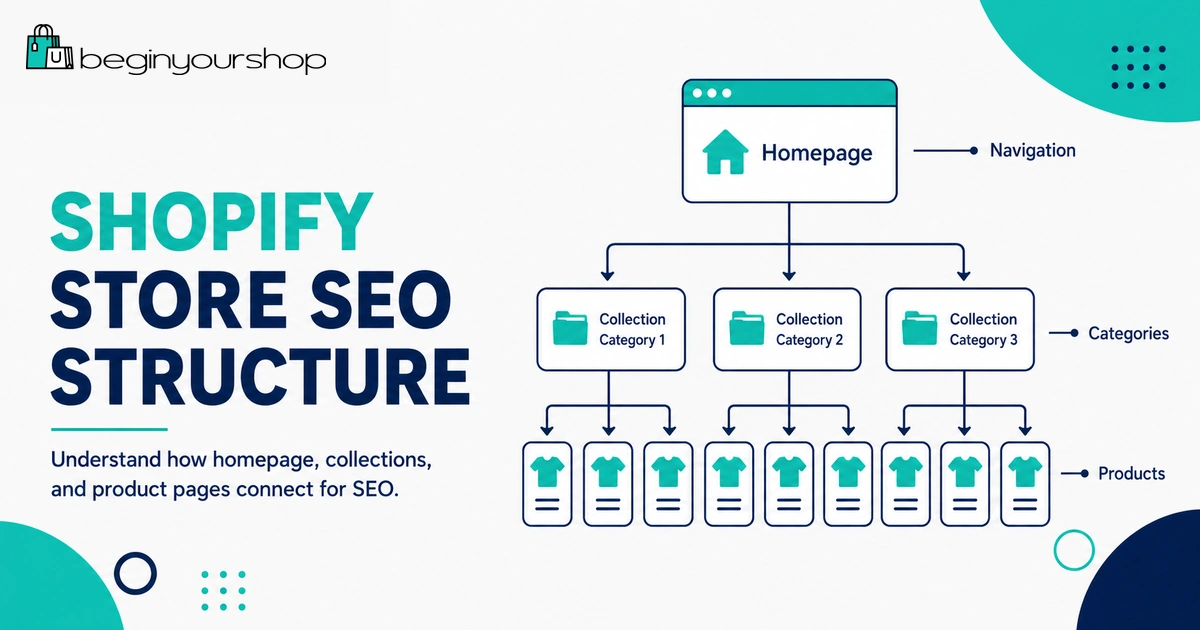
A simple ecommerce structure might look like this:
Homepage
↓
Collections
↓
Products
For a beginner Shopify store, this means your homepage should link to key collections, collections should link to relevant products, and important products should be easy to reach from navigation or internal links.
Good Shopify structure
- Homepage explains the store and links to main collections.
- Main menu uses clear category labels.
- Collections group related products naturally.
- Product pages link to related products or relevant collections.
- Blog posts link to helpful products or collections when relevant.
- Footer includes important trust and policy pages.
Weak Shopify structure
- Products are hard to reach from the homepage.
- Menus use clever names customers do not understand.
- Collections are empty, duplicated, or too broad.
- Blog posts do not link to product or collection pages.
- Important pages are buried with no internal links.
Search engines follow links. Customers follow links. A clear structure helps both.
Homepage SEO
Your homepage is usually the strongest and most general page on your store. It should explain who you are, what you sell, who the products are for, and where visitors should go next.
For a Shopify store, homepage SEO should focus on brand and broad store intent. It should not try to rank for every product keyword.
Homepage SEO checklist
- Use a clear store title and meta description in Online Store preferences.
- Make the hero section explain what the store sells.
- Link to your most important collections.
- Feature best products or product categories.
- Include short trust-building content.
- Make navigation clear.
- Use descriptive image alt text where images are meaningful.
- Do not overload the homepage with every product, banner, or app widget.
Shopify lets you edit the title and meta description for the online store in the Preferences area. Use descriptive text and relevant keywords naturally.
Product Page SEO
Product pages are central to Shopify SEO because they directly match buying intent.
A strong product page should help both customers and search engines understand the product.
Product SEO checklist
- Use a clear product title.
- Write a unique product description.
- Include product details customers need before buying.
- Use high-quality images.
- Add useful image alt text.
- Use variants clearly.
- Show shipping, returns, size, materials, or compatibility information where relevant.
- Edit the search engine listing for important products.
- Use a clean URL handle.
- Link to related products or collections.
Product title
The product title should be descriptive and readable. Avoid vague names such as “Premium Product” or keyword-stuffed names such as “Best Cheap Organic Cotton Baby Blanket Soft Newborn Blanket Gift.”
A better title is:
Organic Cotton Baby Blanket
Product description
Do not copy manufacturer descriptions if many other stores use the same text. Write a description that answers real customer questions.
Useful product description elements include:
- What the product is
- Who it is for
- Key benefits
- Materials or ingredients
- Size, dimensions, or compatibility
- What is included
- How to use or care for it
- Shipping or delivery expectations where relevant
Search engine listing
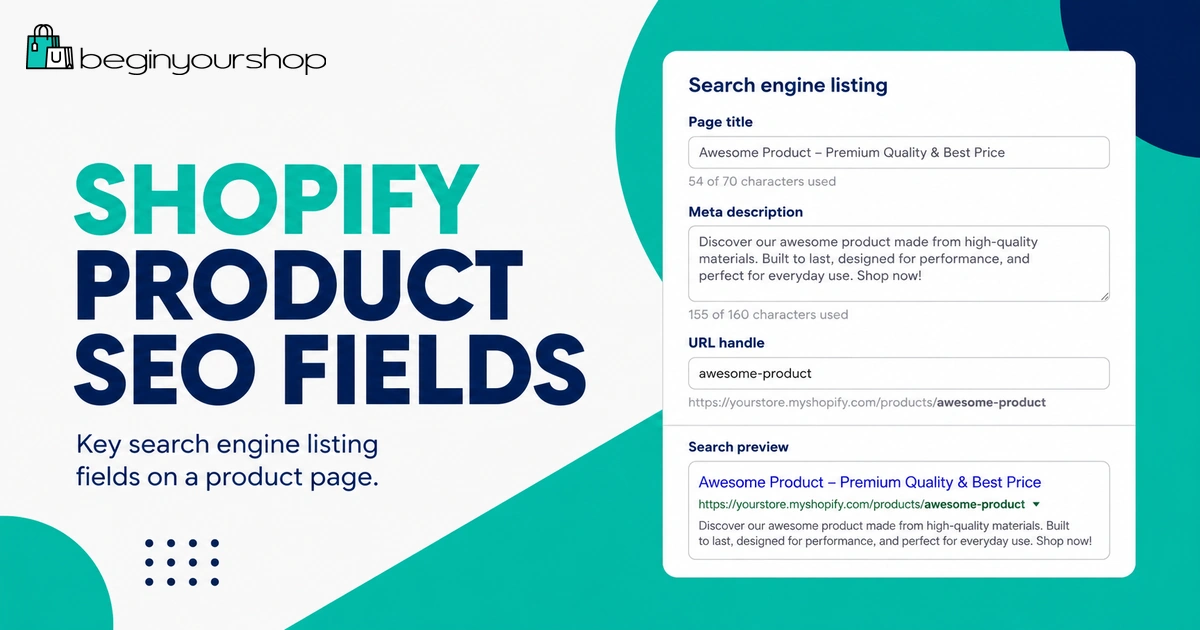
Shopify product pages include a search engine listing area where you can edit the page title, meta description, and URL handle. Shopify’s product documentation also warns not to edit the handle too often, because changing URLs can affect search visibility and require redirects.
Example product SEO fields
Product: Organic Cotton Baby Blanket
SEO title: Organic Cotton Baby Blanket for Newborns
Meta description: Soft organic cotton baby blanket for newborns, designed for everyday comfort, stroller use, nursery layering, and thoughtful baby gifts.
URL handle: organic-cotton-baby-blanket
Collection Page SEO
Collection pages can be powerful SEO pages because they target category-level searches. A collection page may rank for searches such as “linen shirts,” “ceramic mugs,” “minimalist wallets,” or “digital planner templates.”
Many beginners ignore collection SEO and treat collection pages as simple product grids. That is a missed opportunity.
Collection SEO checklist
- Use a clear collection name.
- Add a short, useful collection description.
- Include products that match the collection topic.
- Use clean filters and sorting where helpful.
- Link to important sub-collections if relevant.
- Edit the collection search engine listing.
- Use descriptive internal links to the collection.
- Avoid creating many thin collections with only one or two products unless they serve a clear purpose.
Collection description example
Instead of writing nothing, add a short helpful description:
Explore minimalist leather wallets designed for everyday carry, including slim card holders, bifold wallets, and compact gift-ready styles.
This gives customers and search engines context without overloading the page.
Blog and Content SEO
Blog content can help your store target informational searches that product pages may not naturally cover.
For example, a product page might target “organic cotton baby blanket,” while blog content could target:
- How to choose a baby blanket
- Cotton vs bamboo baby blanket
- Best baby blanket materials for summer
- Baby shower gift ideas
- How many baby blankets do you need?
Blog content can support SEO by attracting early-stage visitors, answering questions, building trust, and internally linking to relevant products or collections.
Good Shopify blog topics
- Buying guides
- Comparison articles
- How-to guides
- Care guides
- Gift guides
- Size and fit guides
- Material explanations
- Use case guides
- Problem-solution articles
Blog SEO checklist
- Choose one clear search intent per post.
- Use a descriptive title.
- Organize the article with helpful headings.
- Answer the query directly near the top.
- Add internal links to related products and collections.
- Add useful images only when they help explain the topic.
- Use descriptive alt text for meaningful images.
- Edit the search engine listing.
- Keep content updated when product details or recommendations change.
Do not write blog posts only to publish more content. Each article should help a customer make a decision, solve a problem, or understand your product category better.
Image SEO and Alt Text
Images are important for ecommerce, but they need to be useful and accessible.
Shopify’s Help Center explains that alt text describes a media item and is an important part of a product description. Shopify also says including alt text can boost SEO.
Alt text best practices
- Describe what is shown in the image.
- Include relevant product details naturally.
- Keep it useful for people who cannot see the image.
- Avoid keyword stuffing.
- Use empty alt text for purely decorative images where appropriate.
Alt text examples
| Image | Weak alt text | Better alt text |
|---|---|---|
| Baby blanket product photo | blanket | Organic cotton baby blanket in cream color folded on a nursery chair |
| Wallet product photo | wallet best wallet leather wallet buy wallet | Minimalist brown leather card holder with three front card slots |
| Decorative arrow | arrow | Use empty alt text if the arrow is only decorative. |
Image file names
Use clear file names when possible. A file name such as organic-cotton-baby-blanket-cream.jpg is more descriptive than IMG_4938.jpg.
Also compress images and use reasonable dimensions so product pages load quickly.
Internal Links
Internal links connect one page on your store to another. They help customers discover related pages and help search engines understand site structure.
Shopify’s site structure guidance recommends using descriptive link text when adding links in product or collection descriptions, webpages, or blog posts.
Good internal link examples
- Link from a blog post about baby shower gifts to a baby blanket collection.
- Link from a product page to a matching accessories collection.
- Link from a buying guide to top products mentioned in the guide.
- Link from a collection page to related collections.
- Link from an FAQ to relevant policy pages.
Descriptive anchor text
Use anchor text that describes the destination.
| Weak anchor text | Better anchor text |
|---|---|
| Click here | Shop organic cotton baby blankets |
| Read more | Read our baby blanket size guide |
| Products | View minimalist leather wallets |
Internal links should be helpful. Do not force links where they do not make sense.
Technical Shopify SEO
Technical SEO is partly handled by Shopify, but beginners should still understand the basics.
Sitemap
Shopify automatically generates a sitemap.xml file. Shopify says the sitemap includes links to all products, primary product images, pages, collections, and blog posts. Sitemap files are automatically updated when you add new products, pages, collections, images, or blog posts.
You can submit the sitemap to Google Search Console to help Google discover your store pages.
Robots.txt
Shopify stores have a default robots.txt file. Shopify says all stores have a preconfigured and optimized robots.txt.liquid template, and you do not need to change it unless you have a specific reason.
Beginners should usually avoid editing robots.txt. Incorrect changes can accidentally block important pages from crawling.
Canonical tags
Shopify’s SEO overview says online stores have auto-generated canonical tags added to pages to help prevent duplicate content from appearing in search results.
This is helpful because ecommerce stores often create multiple paths to similar product or collection content.
Mobile usability
Your store theme should work well on mobile. Product images, menus, variant selectors, cart, and checkout flow should be easy to use on phones.
Page speed
Page speed can be affected by theme quality, images, apps, scripts, videos, fonts, popups, and third-party tools.
Beginners can improve speed by:
- Using optimized images.
- Avoiding unnecessary apps.
- Keeping homepage sections focused.
- Using a clean theme.
- Avoiding heavy videos and scripts unless needed.
- Removing unused app widgets.
URL Redirects
Redirects matter when you change or delete URLs.
For example, if you delete a product page such as /products/blue-t-shirt, you can create a URL redirect to a relevant collection or replacement product. Shopify’s URL redirect documentation gives this type of product deletion scenario as an example.
When to create redirects
- You delete a product that had traffic or links.
- You change a product URL handle.
- You move content to a new URL.
- You replace an old collection with a new collection.
- You migrate content from another platform.
Redirect best practices
- Redirect to the most relevant replacement page.
- Do not redirect everything to the homepage.
- Avoid changing URLs repeatedly.
- Update internal links after changing URLs.
- Monitor 404 errors in Google Search Console where possible.
Shopify also notes that you cannot redirect URLs that use fixed Shopify paths such as /products, /collections, and /collections/all.
Should Beginners Use Shopify SEO Apps?
SEO apps can be useful, but they are not a substitute for good pages.
Shopify’s SEO overview says you can analyze your online store’s SEO using apps in the Shopify App Store. Apps can help with tasks such as audits, metadata, image optimization, schema, redirects, broken links, or structured data checks.
However, beginners should not install an SEO app and assume SEO is finished.
SEO apps can help with:
- Finding missing titles or descriptions
- Detecting broken links
- Optimizing image alt text workflows
- Reviewing structured data
- Managing redirects
- Auditing basic SEO issues
SEO apps cannot replace:
- Useful product descriptions
- Clear collection pages
- Good keyword targeting
- Strong internal linking
- Helpful blog content
- Real customer value
- Brand trust and backlinks
Use SEO apps as tools, not as the strategy.
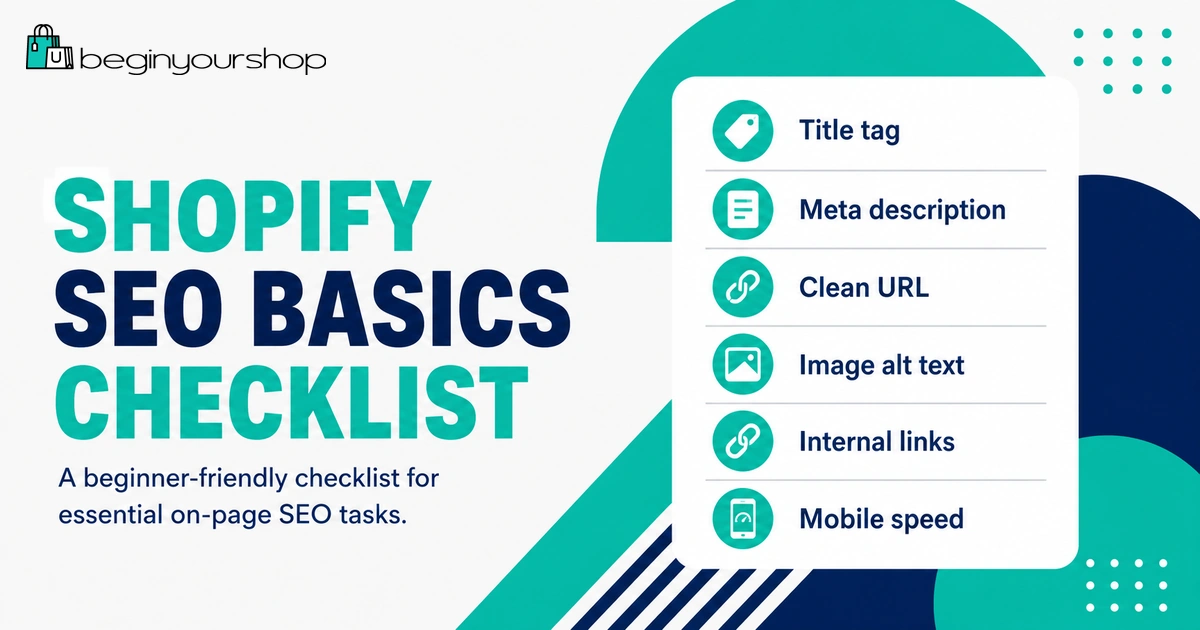
Shopify SEO Checklist for Beginners
Use this checklist before and after launching your store.
| Area | What to check |
|---|---|
| Homepage | Clear title, meta description, hero message, collection links, and brand explanation. |
| Products | Unique descriptions, clear titles, useful images, alt text, clean URLs, and search engine listings. |
| Collections | Clear collection names, useful descriptions, relevant products, filters, and internal links. |
| Navigation | Main menu, footer links, collection links, and important pages are easy to find. |
| Blog content | Helpful articles target real customer questions and link to relevant products or collections. |
| Images | Images are compressed, descriptive, and include useful alt text when meaningful. |
| Internal links | Important pages are linked with descriptive anchor text. |
| Sitemap | Submit /sitemap.xml to Google Search Console after launch. |
| Redirects | Create redirects when deleting or changing important URLs. |
| Apps | Use SEO apps carefully and avoid installing unnecessary apps that slow the store. |
First 30 Days Shopify SEO Plan
Beginners often ask what to do first. Use this simple 30-day plan.
| Timeframe | Focus | Actions |
|---|---|---|
| Week 1 | SEO foundation | Set homepage title and meta description, connect custom domain, check navigation, submit sitemap, and review theme mobile usability. |
| Week 2 | Product pages | Improve top product titles, descriptions, images, alt text, and search engine listings. |
| Week 3 | Collection pages | Review main collections, add useful descriptions, improve filters, and link collections from the homepage. |
| Week 4 | Content and internal links | Publish one or two helpful buying guides or FAQs and link them to relevant products and collections. |
This plan is simple, but it builds a stronger SEO foundation than randomly installing apps or rewriting every page at once.
Common Shopify SEO Mistakes
Mistake 1: Copying supplier product descriptions
Duplicate manufacturer descriptions are common and usually not helpful. Write your own descriptions that answer customer questions.
Mistake 2: Ignoring collection pages
Collections can target category-level keywords. Do not leave important collections with no description or structure.
Mistake 3: Keyword stuffing
Repeating keywords unnaturally makes pages worse for customers and does not create a strong SEO strategy.
Mistake 4: Changing URLs too often
Changing handles repeatedly can create redirect and indexing issues. Choose clean URLs early and keep them stable.
Mistake 5: Not using internal links
Important pages need links. Link from homepage, menus, collections, blog posts, and product descriptions where helpful.
Mistake 6: Using vague image alt text
Alt text such as “image” or “product” is not useful. Describe the image clearly.
Mistake 7: Relying only on SEO apps
Apps can help with audits and workflow, but they cannot write a strong product strategy or useful content for you.
Mistake 8: Blocking pages without understanding robots.txt
Shopify’s default robots.txt is already optimized for most stores. Beginners should not edit it unless there is a specific, informed reason.
Shopify SEO Basics FAQ
Is Shopify good for SEO?
Yes. Shopify includes built-in SEO features such as editable titles and meta descriptions, automatically generated sitemap and robots.txt files, and auto-generated canonical tags. SEO success still depends on your content, product pages, site structure, internal links, theme quality, and authority.
Does Shopify automatically create a sitemap?
Yes. Shopify automatically generates a sitemap.xml file that includes links to products, primary product images, pages, collections, and blog posts. Shopify also updates sitemap files automatically when new content is added.
Where do I edit SEO titles and meta descriptions in Shopify?
You can edit search engine listings for individual products, collections, blog posts, and pages in their SEO or Website SEO preview section. You can also edit the store title and meta description in Online Store preferences.
Should I edit Shopify robots.txt?
Most beginners should not edit Shopify robots.txt. Shopify says all stores have a preconfigured and optimized robots.txt.liquid template, and you do not need to make changes unless you have a specific reason.
What is the best Shopify SEO app?
There is no single best app for every store. SEO apps can help with audits, metadata, redirects, image optimization, or structured data, but they do not replace strong product pages, useful content, and good site structure.
How do I improve product SEO on Shopify?
Use clear product titles, unique descriptions, useful images, descriptive alt text, clean URL handles, relevant product details, internal links, and edited search engine listings for important products.
How do I improve collection SEO on Shopify?
Use clear collection names, add helpful collection descriptions, include relevant products, use filters where helpful, link collections from menus and content, and edit collection SEO titles and meta descriptions.
Is blogging useful for Shopify SEO?
Yes, if the blog answers real customer questions, supports product discovery, targets relevant search intent, and links to appropriate products or collections. Random posts with no connection to your products are less useful.
Do Shopify image alt texts matter?
Yes. Alt text helps describe images for accessibility and can support SEO. Use descriptive alt text for meaningful product and content images, and avoid keyword stuffing.
How long does Shopify SEO take?
SEO usually takes time. New stores may need weeks or months to gain impressions, clicks, and rankings. Focus first on a strong foundation, then improve content and authority over time.
Should I submit my Shopify sitemap to Google Search Console?
Yes. Shopify automatically creates the sitemap, and submitting it to Google Search Console can help Google discover and index your store pages.
Can I hide a Shopify page from search engines?
Yes. Shopify provides methods for hiding certain pages, products, or blog posts from search engines, such as using a custom metafield or other supported approaches. Use this carefully and only when you understand the impact.
Final Thoughts
Shopify SEO basics are not about tricks. They are about clarity, structure, usefulness, and consistency.
Start with your most important pages: homepage, key collections, top products, and helpful content that answers customer questions. Write clear titles and descriptions, use descriptive image alt text, build internal links, keep URLs stable, submit your sitemap, and avoid unnecessary technical changes.
Shopify gives you a solid technical starting point, but your content and store structure determine how useful your store is to both customers and search engines.
Next recommended guide: How to Add Products on Shopify