Shopify vs WooCommerce
Shopify and WooCommerce are two of the most popular ways to build an online store, but they are very different platforms.
Shopify is a hosted ecommerce platform. You pay Shopify for the store builder, hosting, checkout, admin, security, updates, and ecommerce infrastructure in one system. WooCommerce is a free, open-source ecommerce plugin for WordPress. You can install the core plugin for free, but you are responsible for hosting, WordPress maintenance, plugin compatibility, security, backups, and many setup decisions.
For beginners, the choice usually comes down to this: Shopify is simpler to start and manage, while WooCommerce gives you more control if you are comfortable managing a WordPress website.
This guide compares Shopify and WooCommerce across pricing, ease of use, design, payments, SEO, maintenance, scalability, ownership, and long-term fit.
Last checked: May 8, 2026. Platform features, pricing, fees, and product names can change. Always confirm current details on Shopify and WooCommerce official websites before choosing a platform.

Quick Verdict
Choose Shopify if...
- You want the easiest path to launch.
- You do not want to manage hosting or WordPress maintenance.
- You prefer a hosted ecommerce system with built-in checkout.
- You want beginner-friendly setup and support.
- You are willing to pay a monthly platform fee for convenience.
Choose WooCommerce if...
- You already know WordPress or have a WordPress site.
- You want more control over hosting, code, and customization.
- You are comfortable managing plugins, updates, and performance.
- You want open-source flexibility.
- You can handle more technical responsibility or hire help.
For most first-time store owners who want to start quickly, Shopify is usually the better beginner choice. For website owners who already use WordPress and want maximum control, WooCommerce can be the better long-term fit.
Shopify vs WooCommerce: Best For
The best platform depends on your priorities. Shopify and WooCommerce can both run serious ecommerce stores, but they serve different types of users.
| Situation | Better choice | Why |
|---|---|---|
| First online store | Shopify | Hosted setup, simpler admin, fewer technical decisions. |
| Existing WordPress content site | WooCommerce | It integrates directly with WordPress content and existing site structure. |
| Least technical maintenance | Shopify | Hosting, security updates, checkout, and ecommerce infrastructure are managed by Shopify. |
| Maximum code and hosting control | WooCommerce | You choose hosting, plugins, custom code, and site architecture. |
| Fast launch with minimal setup | Shopify | Better for beginners who want to build and launch without learning WordPress maintenance. |
| Complex content-driven site | WooCommerce | WordPress is strong for blogs, editorial sites, and content-heavy structures. |
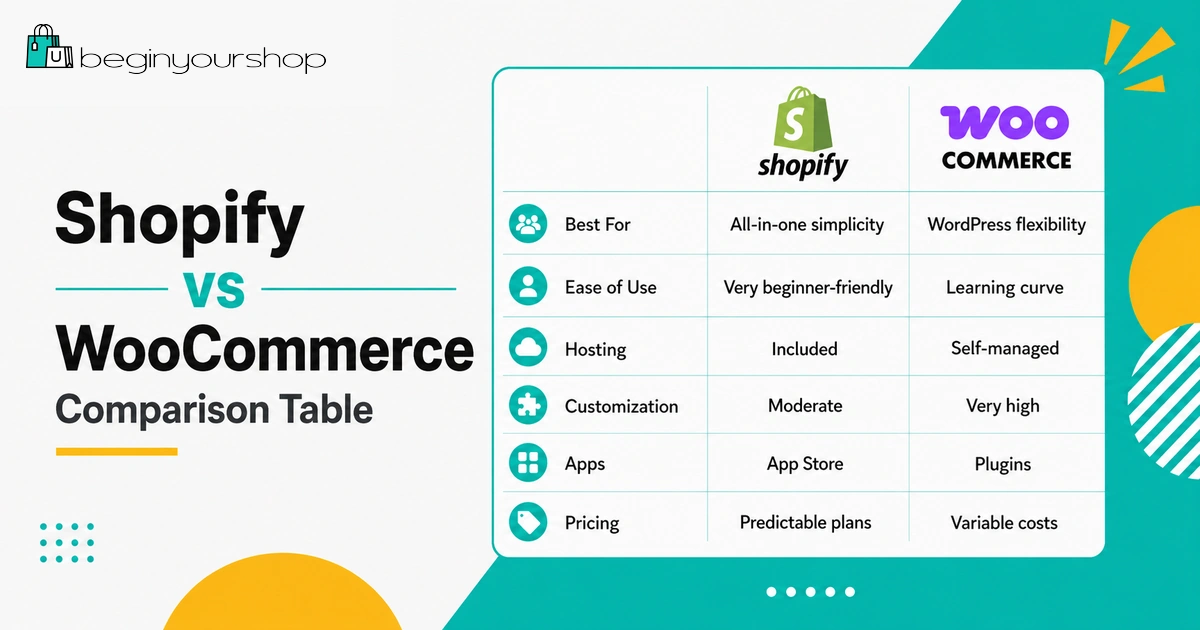
Shopify vs WooCommerce Comparison Table
| Category | Shopify | WooCommerce |
|---|---|---|
| Platform type | Hosted ecommerce platform | Open-source ecommerce plugin for WordPress |
| Core cost | Paid monthly or yearly plan | Core plugin is free; hosting and other costs are separate |
| Hosting | Included | You choose and pay for hosting |
| Ease of use | Easier for most beginners | More flexible but more technical |
| Maintenance | Platform maintenance handled by Shopify | You manage WordPress, plugins, theme updates, backups, and compatibility |
| Payments | Shopify Payments and third-party providers | Many gateways through plugins, including WooPayments |
| Transaction fees | Third-party transaction fees may apply if not using Shopify Payments | WooCommerce core does not charge platform transaction fees, but payment gateways charge processing fees |
| Design | Theme-based storefront builder | WordPress themes, block editor, page builders, and custom development |
| SEO | Good ecommerce SEO basics | Strong WordPress content SEO flexibility |
| Best beginner fit | Better for most non-technical beginners | Better for WordPress users or technical owners |
What Is Shopify?
Shopify is a hosted ecommerce platform that lets you create and manage an online store without setting up your own hosting or installing ecommerce software manually.
With Shopify, you can add products, customize a storefront theme, accept payments, manage orders, connect a domain, configure shipping, install apps, and launch a store from one admin dashboard.
Shopify is designed to reduce technical complexity. You do not have to manage server updates, WordPress plugin conflicts, hosting performance, or checkout infrastructure yourself.
Shopify is especially attractive for beginners because it provides a structured ecommerce environment. The trade-off is that you pay a subscription fee and work within Shopify’s platform rules, checkout system, and app ecosystem.
What Is WooCommerce?
WooCommerce is a free, open-source ecommerce plugin for WordPress. It turns a WordPress website into an online store.
Because WooCommerce runs on WordPress, it gives you a high level of control. You can choose your hosting provider, theme, plugins, development approach, checkout extensions, and site architecture.
The core WooCommerce plugin is free to download and use, but running a real WooCommerce store usually involves other costs, such as hosting, domain registration, paid themes, premium extensions, security tools, backups, developer help, and payment processing fees.
WooCommerce can be a powerful choice if you already understand WordPress or are willing to manage the technical side. For beginners who do not want to deal with hosting and maintenance, it can feel more complicated than Shopify.
Ease of Use
Ease of use is one of the biggest differences between Shopify and WooCommerce.
Shopify ease of use
Shopify is built around a single hosted admin. You do not need to install WordPress, choose a separate hosting stack, configure server settings, manage plugin compatibility, or troubleshoot core platform updates.
For most beginners, Shopify is easier because the setup path is more guided:
- Create a Shopify account
- Add products
- Choose and customize a theme
- Set up payments
- Set up shipping
- Connect a domain
- Test checkout
- Launch
WooCommerce ease of use
WooCommerce can be simple if you already know WordPress. But if you are new to WordPress and ecommerce at the same time, you may face more setup decisions.
A WooCommerce store may require you to think about WordPress hosting, theme compatibility, payment plugins, shipping plugins, security, backups, performance optimization, plugin conflicts, and updates.
WooCommerce gives you flexibility, but flexibility comes with responsibility.
Beginner takeaway: Shopify is easier if you want a guided ecommerce platform. WooCommerce is better if you want WordPress control and are comfortable managing more of the technical stack.
Pricing and Total Cost
Shopify and WooCommerce use very different pricing models.
Shopify pricing model
Shopify charges a recurring subscription for its ecommerce platform. As of the latest checked U.S. pricing page, Shopify lists plans such as Basic, Grow, Advanced, and Plus, with Basic starting at $29 USD/month when billed yearly. Shopify pricing can vary by region, billing cycle, taxes, currency, and promotion.
Shopify costs may include:
- Monthly or yearly Shopify plan
- Payment processing fees
- Third-party transaction fees if using third-party payment providers
- Paid apps
- Paid themes
- Domain name
- POS tools if selling in person
- Marketing, shipping, inventory, and business costs
WooCommerce pricing model
WooCommerce’s core plugin is free and open source. That makes WooCommerce attractive, but it does not mean a real store has no cost.
WooCommerce costs may include WordPress hosting, domain name, SSL if not included with hosting, premium themes, paid extensions, payment gateway fees, security tools, backup tools, performance optimization, and developer or maintenance help.
WooCommerce can be cheaper if you manage it well and keep your setup simple. It can also become expensive if you need premium extensions, custom development, managed hosting, or ongoing technical support.
| Cost area | Shopify | WooCommerce |
|---|---|---|
| Platform | Paid subscription | Core plugin is free |
| Hosting | Included | Paid separately |
| Domain | Paid separately or through Shopify | Paid separately |
| Themes | Free and paid themes | Free and paid WordPress/WooCommerce themes |
| Apps / plugins | Free and paid apps | Free and paid plugins/extensions |
| Maintenance | Mostly handled by Shopify | Your responsibility or your developer’s responsibility |
Design and Themes
Both Shopify and WooCommerce support professional-looking stores, but the design workflow is different.
Shopify design
Shopify uses themes designed specifically for Shopify stores. You can start with a free theme or buy a paid theme from the Shopify Theme Store. The theme editor lets you customize sections, colors, typography, product layouts, navigation, and homepage content without editing code for basic changes.
Shopify design is more structured. This is helpful for beginners because it reduces the number of ways to break the site. The downside is that deep customization may require theme code editing or paid development.
WooCommerce design
WooCommerce uses WordPress themes. You can use WooCommerce-compatible themes, the WordPress block editor, or page builders depending on your setup.
WooCommerce can offer more design freedom, especially if you have WordPress design experience. But more freedom can also mean more compatibility and performance considerations.
Payments and Transaction Fees
Payments are another major difference between Shopify and WooCommerce.
Shopify payments
Shopify offers Shopify Payments in supported countries and regions, plus third-party payment providers. If you use Shopify Payments, Shopify says you generally avoid third-party transaction fees on orders processed through Shopify Payments. Payment processing fees still apply.
If you use a third-party payment provider, Shopify may charge third-party transaction fees in addition to the fees charged by your payment provider. The exact rates depend on plan and region.
WooCommerce payments
WooCommerce supports many payment gateways through plugins and extensions. WooPayments is WooCommerce’s own payment solution in supported regions, and many stores also use Stripe, PayPal, Square, Authorize.net, and other gateways.
WooCommerce core does not work like a hosted platform that charges a separate subscription transaction fee for every order. However, payment processors still charge processing fees, and some payment-related extensions or services may have their own costs.
Apps, Plugins, and Extensions
Shopify has an App Store. WooCommerce has WordPress plugins and WooCommerce extensions.
Shopify apps can add reviews, subscriptions, bundles, email marketing, upsells, shipping tools, analytics, dropshipping, print-on-demand, SEO tools, and many other features. They are usually easy to install, but paid apps can quickly increase monthly cost.
WooCommerce has a large ecosystem of free and paid plugins. The benefit is flexibility. The risk is complexity: too many plugins can create performance issues, conflicts, security risks, and maintenance burden.
Beginner rule
Whether you choose Shopify or WooCommerce, do not install tools just because they exist. Every app or plugin should solve a real business problem.
SEO and Content Marketing
Both Shopify and WooCommerce can support SEO, but they have different strengths.
Shopify covers many ecommerce SEO basics: product pages, collection pages, meta titles, meta descriptions, redirects, canonical URLs, editable image alt text, blog posts, and structured ecommerce data in many themes. For many ecommerce stores, Shopify SEO is good enough to start.
WooCommerce benefits from the WordPress ecosystem. If content marketing, blogging, editorial SEO, and custom site structure are central to your strategy, WooCommerce can be very strong. WordPress gives you extensive control through SEO plugins, custom post types, content layouts, internal linking tools, schema plugins, and theme customization.
If your store is primarily ecommerce and you want simplicity, Shopify is strong enough for most beginners. If your business depends heavily on content publishing and you already know WordPress, WooCommerce can offer more SEO flexibility.
Maintenance and Security
This is one of the most important practical differences.
Shopify handles much of the hosted platform infrastructure. You still need to manage your store content, apps, themes, settings, customer service, and business operations, but you do not manage the ecommerce platform server yourself.
With WooCommerce, you are responsible for the WordPress environment. That means updates, backups, security, hosting performance, plugin compatibility, theme compatibility, and troubleshooting.
You can reduce the WooCommerce maintenance burden with managed WordPress hosting and professional support, but that adds cost.
Scalability
Both platforms can scale, but they scale differently.
Shopify scales by moving through higher plans, using better apps, improving operations, and eventually considering Shopify Plus for complex or high-volume businesses. Because Shopify is hosted, you do not manage server resources in the same way as a self-hosted WooCommerce store.
WooCommerce can scale, but scaling depends heavily on hosting quality, database performance, caching, plugin choices, theme performance, and developer expertise. A well-built WooCommerce store can perform well; a poorly built WooCommerce store with too many plugins on cheap hosting can become slow and unstable.
Ownership and Control
WooCommerce gives more control over your website environment. Shopify gives more operational simplicity.
With Shopify, your store runs on Shopify’s hosted platform. You control products, themes, content, apps, settings, and much of the storefront experience, but you operate within Shopify’s platform rules and ecosystem.
With WooCommerce, you control the WordPress site, hosting provider, codebase, plugins, theme, database, and many technical decisions. This can be powerful for developers and advanced site owners.
For beginners, more control is not always better. Control is useful only if you can manage it or afford someone who can.
Which Should You Choose?
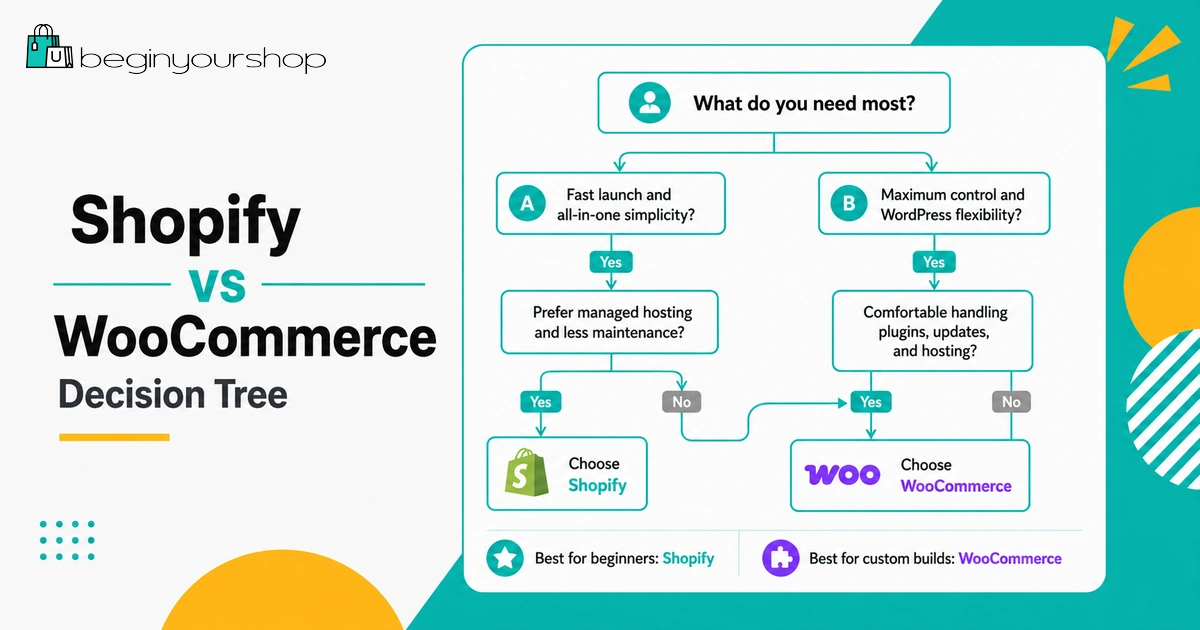
Choose Shopify if you want:
- A beginner-friendly ecommerce setup
- Hosted platform convenience
- Less technical maintenance
- Integrated store builder and checkout
- A faster path to launch
- Support from one main ecommerce platform
Choose WooCommerce if you want:
- WordPress control
- Open-source flexibility
- More hosting and code control
- A content-heavy website with ecommerce attached
- Freedom to customize deeply
- The ability to manage or hire for technical maintenance
For most non-technical beginners, Shopify is usually the safer first choice. It reduces setup complexity and lets you focus more on products, store design, payments, shipping, and launch.
WooCommerce is a strong choice if you already have a WordPress site, care deeply about content SEO, want open-source control, or have technical support available.
Can You Switch Later?
Yes, but switching platforms is not effortless.
You can migrate products, customers, orders, content, domains, and redirects between platforms, but migrations can create work around URLs, SEO, design, apps, checkout, customer accounts, order history, and analytics.
If you are deciding now, choose the platform that best fits your next 12 to 24 months, not just the platform that sounds ideal in theory.
Shopify vs WooCommerce FAQ
Is Shopify better than WooCommerce for beginners?
For most non-technical beginners, yes. Shopify is usually easier to start with because hosting, checkout, platform updates, security infrastructure, and ecommerce admin tools are handled inside one hosted system.
Is WooCommerce cheaper than Shopify?
WooCommerce core is free, but a real WooCommerce store still needs hosting, a domain, payment processing, and often paid themes, extensions, security tools, backups, or developer support. WooCommerce can be cheaper, but it is not automatically cheaper for every store.
Does WooCommerce charge transaction fees?
WooCommerce core does not charge a platform transaction fee in the same way Shopify may charge third-party transaction fees. However, payment gateways such as WooPayments, Stripe, PayPal, or other providers charge payment processing fees.
Does Shopify charge transaction fees?
Shopify charges payment processing fees. If you use a third-party payment provider instead of Shopify Payments, Shopify may also charge third-party transaction fees depending on plan and location.
Which platform is better for SEO?
WooCommerce has stronger WordPress-based SEO flexibility, especially for content-heavy sites. Shopify is strong enough for many ecommerce stores and is often easier to manage for beginners.
Which platform is better for dropshipping?
Both can support dropshipping through apps or plugins. Shopify is often easier for beginners because the app ecosystem and hosted store setup are more straightforward.
Which platform is better for blogging?
WooCommerce is built on WordPress, so it is usually stronger for advanced blogging, editorial content, and content-heavy SEO strategies. Shopify has a built-in blog feature, but WordPress is more flexible for content sites.
Can WooCommerce handle a large store?
Yes, WooCommerce can handle large stores if the hosting, database, caching, theme, plugins, and development work are handled properly. Poor hosting or plugin bloat can create performance problems.
Can Shopify handle a large store?
Yes. Shopify can support growing and high-volume stores, and Shopify Plus is designed for more complex or enterprise-level ecommerce needs.
Which one should I choose if I already have a WordPress site?
If your WordPress site already has strong content, traffic, and SEO value, WooCommerce may be worth considering because it integrates with your existing site. If ecommerce simplicity matters more than WordPress control, Shopify may still be better.
Final Thoughts
Shopify and WooCommerce are both capable ecommerce platforms, but they solve different problems.
Shopify is best for beginners who want a simpler, hosted way to launch and manage an online store. WooCommerce is best for users who want WordPress control, open-source flexibility, and more technical ownership.
If your main goal is to start your first store without managing hosting, updates, plugin conflicts, or technical maintenance, Shopify is usually the better fit.
If your main goal is to build a deeply customized WordPress-based ecommerce site and you are comfortable managing the technical side, WooCommerce can be a powerful choice.
The right choice is not the platform with the longest feature list. It is the platform that fits your skills, budget, business model, and willingness to handle technical work.
Next recommended guide: Shopify Free Trial Explained for Beginners