Shopify Pricing Explained
Shopify pricing can look simple at first: choose a plan, pay the monthly subscription, and start selling. In practice, the real cost of Shopify includes more than the plan price. You also need to understand payment processing fees, third-party transaction fees, app costs, themes, domains, POS costs, shipping tools, and the difference between monthly and yearly billing.
This guide explains Shopify pricing for beginners in plain English. It covers the main Shopify plans, what each plan is best for, how payment fees work, which extra costs to expect, and how to choose the right plan without overspending.
Last checked: May 8, 2026. Shopify pricing, offers, fees, and plan names can change by country, currency, billing cycle, eligibility, and time. Always confirm the latest terms on Shopify’s official pricing page before choosing a plan.

Quick Answer
For most beginners, the best Shopify plan to start with is the Basic plan. It is usually enough for a new online store that is run by one person and does not need advanced reporting, multiple staff accounts, or enterprise-level features.
Best for most beginners
Basic
Start here if you are launching your first Shopify store and want to keep fixed monthly costs low.
Best for small teams
Grow
Consider this when you need staff accounts, lower card rates, or more room to manage a growing business.
Best for scaling
Advanced
Use this when you need advanced features, lower fees, more staff accounts, and global selling tools.
The cheapest plan is not always the cheapest overall. If you process many sales, payment rates and third-party transaction fees can matter more than the subscription price. But for a new store with little or no sales volume, fixed monthly cost usually matters most.
Shopify Pricing Overview
Shopify’s main ecommerce plans are designed for different stages of business growth:
- Basic: For solo entrepreneurs and new stores.
- Grow: For small teams and growing businesses.
- Advanced: For businesses with more complex reporting, shipping, staff, and international needs.
- Plus: For complex, high-volume, or enterprise businesses.
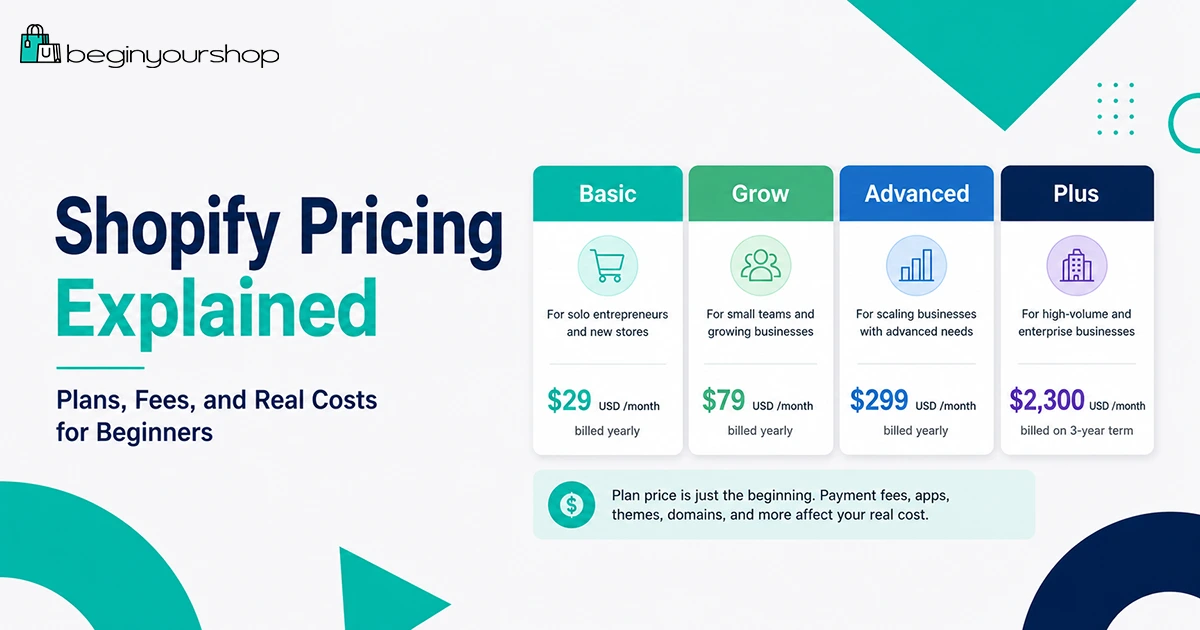
As of the latest checked official pricing, Shopify lists yearly billed prices starting at $29 USD/month for Basic, $79 USD/month for Grow, $299 USD/month for Advanced, and $2,300 USD/month for Plus on a 3-year term. Shopify also displays promotional offers such as a free trial and a low introductory price for eligible users. These offers can change.
Pricing note: The prices in this article use Shopify’s U.S. pricing page as the reference point. Your price can differ based on country, currency, taxes, billing cycle, and current promotion.
Shopify Plan Comparison Table
The table below summarizes the main Shopify plans from a beginner’s perspective.
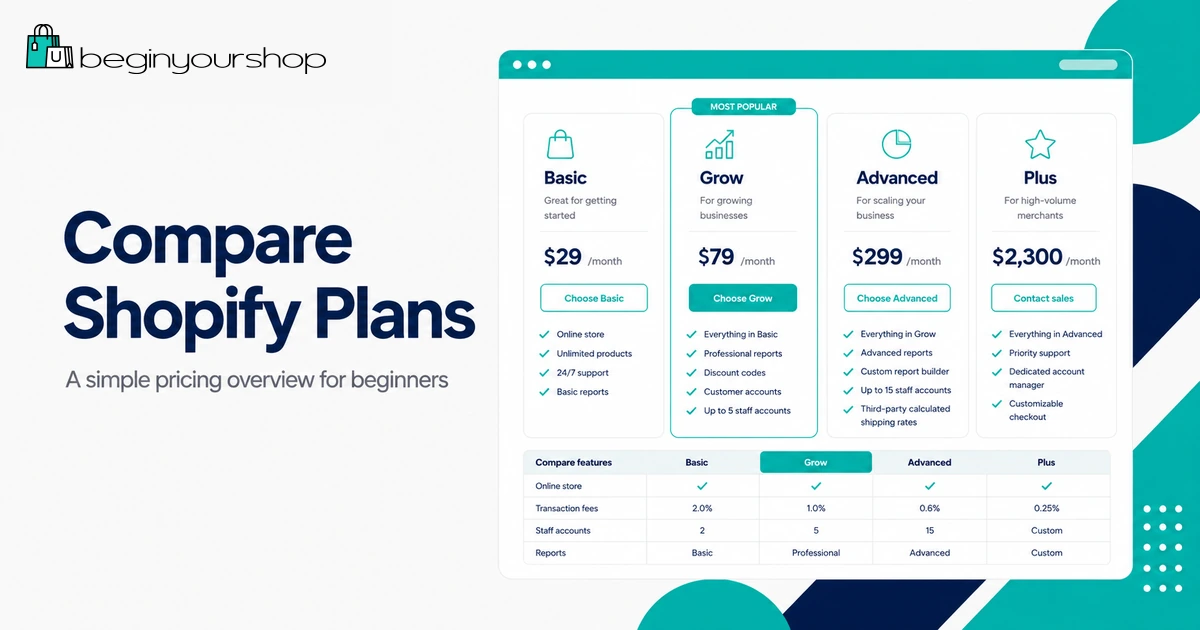
| Plan | Starting price | Best for | Online card rate from | In-person card rate from | Third-party transaction fee | Key feature notes |
|---|---|---|---|---|---|---|
| Basic | $29 USD/month billed yearly | Solo entrepreneurs and first stores | 2.9% + 30¢ USD | 2.6% + 10¢ USD | 2% | Good starting point for most beginners. |
| Grow | $79 USD/month billed yearly | Small teams and growing stores | 2.7% + 30¢ USD | 2.5% + 10¢ USD | 1% | Includes up to 5 staff accounts and lower card rates. |
| Advanced | $299 USD/month billed yearly | Businesses with global reach or advanced needs | 2.5% + 30¢ USD | 2.4% + 10¢ USD | 0.6% | Includes up to 15 staff accounts, live third-party shipping rates, and regional tools. |
| Plus | Starting at $2,300 USD/month billed yearly on a 3-year term | High-volume and complex businesses | Best rates for high-volume merchants | Varies | Varies by setup and location | Custom checkout, B2B, unlimited staff accounts, and enterprise support. |
Do not choose a plan based only on the plan name. Choose based on your real needs: how many people manage the store, how many sales you process, which payment provider you use, whether you need advanced reporting, and whether your store is selling internationally.
How Shopify Billing Works
Shopify pricing has several parts. Beginners often only look at the subscription price, but your total bill can include other charges.
1. Subscription fee
This is the recurring cost of your Shopify plan. It gives you access to the Shopify platform, admin, hosted storefront, checkout, product tools, theme system, and plan-level features.
2. Billing cycle
Shopify usually lets merchants choose between monthly and yearly billing on the main plans. Yearly billing can offer a discount on select plans, but it requires a larger upfront commitment.
If you are testing a business idea and cash flow is tight, monthly billing can be safer. If you are confident you will use Shopify for the full year, yearly billing can reduce the monthly equivalent cost.
3. Promotional pricing
Shopify may offer a free trial and a discounted introductory period. Promotional offers are useful, but they should not be treated as your long-term operating cost.
Before choosing a plan, look at the price after the promotion ends. That is the number you need to budget for.
4. Payment processing fees
When a customer pays with a card or supported payment method, payment processing fees apply. These fees vary by plan, payment method, card type, country, and whether the transaction is domestic, international, online, or in person.
5. Third-party transaction fees
If you use a third-party payment provider instead of Shopify Payments, Shopify may charge additional third-party transaction fees. These are separate from the fees your payment provider charges.
6. App, theme, domain, and service costs
Your Shopify subscription is not always your only cost. Many stores also pay for apps, a domain, premium themes, email tools, product review tools, shipping tools, accounting tools, design services, or marketing tools.
Basic Plan
The Basic plan is the best starting point for most new Shopify stores. It is designed for solo entrepreneurs and smaller stores that want to sell online without paying for advanced features too early.
Choose Basic if:
- You are launching your first Shopify store.
- You are working alone or do not need multiple staff accounts.
- You want to keep fixed monthly costs low.
- You do not need advanced reporting yet.
- You are still testing products, positioning, and marketing channels.
Basic is not “basic” in the sense of being unusable. It can support a real online store. You can add products, customize your theme, accept payments, manage orders, create policies, connect a domain, and start selling.
The main reason to move beyond Basic is not status. It is business need. Upgrade when the additional features or lower payment rates justify the higher monthly cost.
Grow Plan
The Grow plan is meant for businesses that have moved beyond the solo beginner stage. It can make sense when your store has more consistent sales, more operational needs, or multiple people helping manage the business.
Consider Grow if:
- You need staff accounts for team members.
- You want lower card rates than Basic.
- Your store has consistent sales volume.
- You need better reporting or operational features.
- Your business has enough revenue to justify the higher subscription cost.
The key question is whether Grow saves or earns more than it costs. If you process enough sales, lower payment rates may reduce total fees. If you need staff access, Grow can also be operationally necessary.
When Grow may not be worth it yet
If your store has low sales volume and you work alone, Grow may add cost without adding enough practical benefit. In that case, Basic is usually the better starting point.
Advanced Plan
The Advanced plan is built for stores with more complex needs. It can be useful for businesses that need more staff accounts, more advanced selling capabilities, lower card rates, live third-party shipping rates, or stronger international tools.
Consider Advanced if:
- You have a team managing operations, fulfillment, marketing, and support.
- You process enough sales that lower card rates matter.
- You need live third-party shipping rates.
- You sell across regions and need more flexibility.
- You need a stronger operational setup before considering Shopify Plus.
Advanced is usually not the right first plan for a beginner. It becomes more logical when your store has real sales, real operational complexity, and a clear need for the features.
Shopify Plus
Shopify Plus is Shopify’s enterprise-level plan for high-volume, complex, or fast-scaling businesses. It is not designed for most beginners.
Shopify Plus can include advanced features such as customizable checkout, B2B and wholesale selling, unlimited staff accounts, advanced automation options, and priority support. It can be valuable for larger brands, but the cost and commitment are much higher than the standard plans.
Beginners should not choose Plus unless they already have a business case for it. If you are just starting, focus on building a clear store, validating products, and getting your first sales.
Payment Fees and Transaction Fees
Payment fees are often the most misunderstood part of Shopify pricing. There are two different fee categories beginners should understand:
- Payment processing fees: Fees charged for processing customer payments.
- Third-party transaction fees: Additional Shopify fees that can apply when using third-party payment providers instead of Shopify Payments.
Shopify Payments
Shopify Payments is Shopify’s built-in payment processor in supported countries and regions. If Shopify Payments is available for your business and you use it as your processor, you generally avoid Shopify’s third-party transaction fees for orders processed through Shopify Payments.
You still pay payment processing fees. Those fees vary depending on your plan, card type, transaction type, and location.
Third-party payment providers
If you use a third-party payment provider, you may pay both:
- The payment provider’s own processing fees.
- Shopify’s third-party transaction fee for your plan.
This is why a third-party payment provider can be more expensive than it looks at first. It may still be necessary if Shopify Payments is not available in your country, does not support your business type, or you need a specific payment provider.
Simple fee example
Imagine your store receives a $100 online card order. Depending on your plan and payment setup, you may pay a percentage fee plus a fixed fee. If you use a third-party provider, you may also pay the third-party transaction fee on top of your provider’s processing cost.
| Scenario | What you may pay | Beginner takeaway |
|---|---|---|
| Using Shopify Payments | Payment processing fee based on plan and transaction type | Usually simpler if available and eligible. |
| Using a third-party provider | Provider fee plus possible Shopify third-party transaction fee | Check total fees before choosing this route. |
| International cards or currency conversion | Additional fees may apply depending on location and payment type | International selling can change your real cost per order. |
Extra Shopify Costs to Expect
Shopify’s plan price is only one part of your store budget. Below are common extra costs beginners should expect.
Domain name
Your store can use a free myshopify.com domain, but a real brand should usually use a custom domain. You can buy a domain through Shopify or connect one from another provider.
Theme costs
Shopify provides free and paid themes. Many beginners can launch with a free theme. A premium theme may be useful later if it gives you layout options, product page features, or design flexibility you truly need.
App costs
Apps can add reviews, email marketing, subscriptions, bundles, upsells, fulfillment tools, SEO helpers, print-on-demand services, analytics, and many other features.
Apps are useful, but they are also one of the easiest ways to increase monthly cost. Avoid installing apps until you know what problem they solve.
Email marketing tools
You may eventually need email capture, newsletters, abandoned cart campaigns, and customer segmentation. Some tools have free tiers; others charge by subscriber count or usage.
POS costs
If you sell in person, Shopify POS may add costs depending on your setup. Shopify lists POS Pro as a separate option for advanced retail features.
Shipping and fulfillment tools
Some stores can manage shipping with Shopify’s built-in tools. Others need apps or external services for fulfillment, labels, tracking, pickup, or international shipping.
Taxes and accounting
Depending on your location and business model, you may need accounting software, tax tools, or professional help. These costs are not always part of Shopify, but they are part of running a store.
Product and marketing costs
Your largest costs may not be software. Inventory, product samples, packaging, photos, influencer samples, ads, email campaigns, and content creation can be more significant than the Shopify plan itself.
Realistic Shopify Budget Examples
The numbers below are examples, not guarantees. They are meant to help you think about budget categories.
| Budget type | Likely setup | Monthly software cost | Other costs to expect | Best for |
|---|---|---|---|---|
| Lean beginner | Basic plan, free theme, few or no paid apps | Lowest ongoing setup | Domain, product samples, payment fees, possible email tool | Testing a first store idea. |
| Serious launch | Basic or Grow, custom domain, selected apps | Moderate | Apps, product photos, email marketing, inventory or fulfillment costs | Launching a real brand with a clear product plan. |
| Growth stage | Grow or Advanced, multiple apps, team workflows | Higher | Marketing, support, fulfillment, accounting, analytics, team costs | Stores with consistent sales and operational needs. |
Beginner monthly cost stack
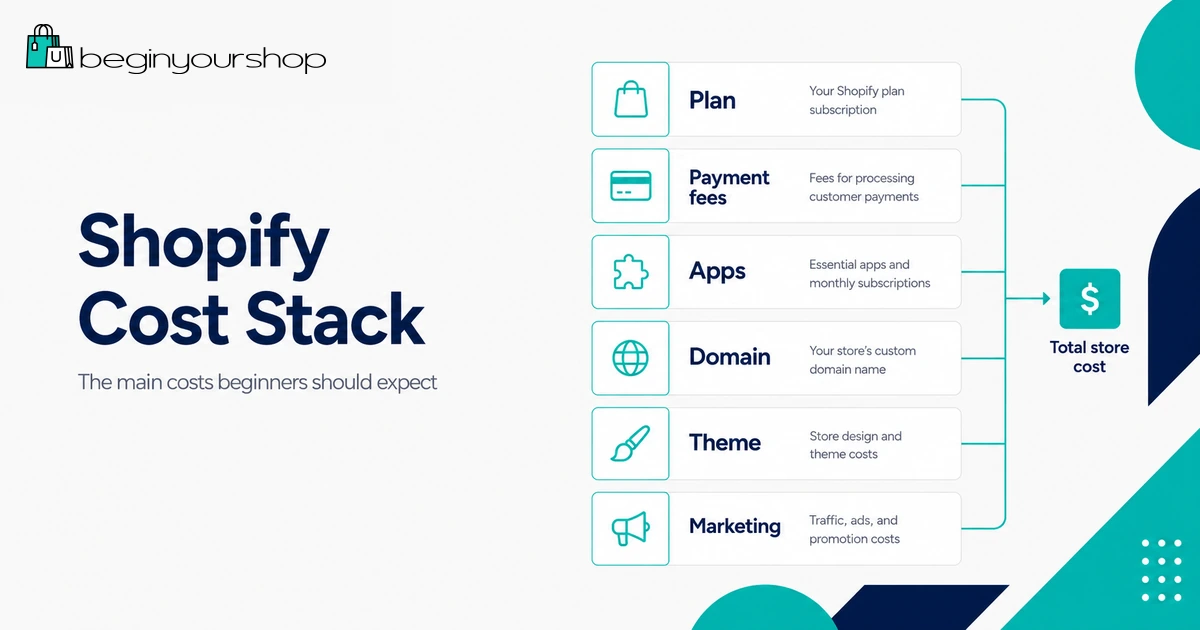
A beginner Shopify budget might include:
- Shopify plan subscription
- Payment processing fees
- Domain name
- One or two essential apps
- Email marketing or newsletter tool
- Product samples or inventory
- Shipping supplies or fulfillment costs
- Marketing budget
Do not spend your entire budget on software. A store also needs products, content, traffic, and trust.
Which Shopify Plan Should Beginners Choose?
Most beginners should start with Basic, unless there is a clear reason not to.
Beginner decision rule
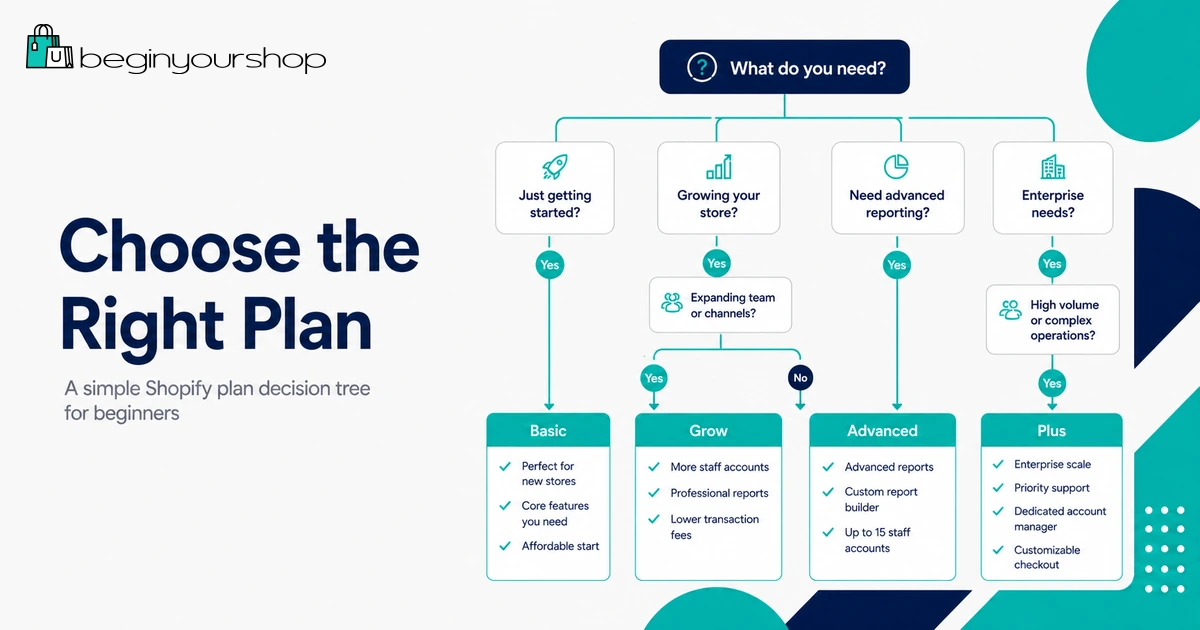
- Choose Basic if you are launching your first store and working alone.
- Choose Grow if you need staff accounts or your sales volume justifies lower card rates.
- Choose Advanced if you need advanced shipping, more staff accounts, or regional/global selling features.
- Choose Plus only if your business is already complex or high-volume.
If you are unsure, begin with Shopify’s trial, build the store, understand the admin, and compare plan features before committing to a long billing cycle.
Read our Shopify free trial guide
How to Keep Shopify Costs Low
Keeping costs low does not mean building a weak store. It means spending only where the cost supports your business.
Start with a free theme
Use a free Shopify theme until you know exactly what a paid theme would improve.
Limit paid apps
Every app should have a job. If an app does not help customers buy, help you fulfill orders, or help you measure performance, wait before installing it.
Use Shopify Payments if it fits your business
If Shopify Payments is available and suitable for your business, it can simplify payments and help avoid third-party transaction fees.
Choose monthly billing while testing
Yearly billing can save money, but monthly billing can reduce risk when you are still validating an idea.
Upgrade only when there is a reason
Do not upgrade because a higher plan feels more professional. Upgrade when the feature or fee savings justify the additional cost.
Track app subscriptions
Review installed apps regularly. Remove anything you do not use.
Common Shopify Pricing Mistakes
Mistake 1: Only looking at the monthly plan price
The subscription price is important, but payment fees, apps, themes, domains, shipping tools, and marketing can change your real cost.
Mistake 2: Choosing a higher plan too early
A higher plan is not automatically better. If your store has no traffic and no sales yet, the extra monthly cost may not help.
Mistake 3: Ignoring third-party transaction fees
If you use a third-party payment provider, check whether Shopify’s additional transaction fees apply and how they combine with your provider’s fees.
Mistake 4: Installing too many apps
Apps can quietly become a large monthly expense. Start with the fewest apps possible.
Mistake 5: Treating promotional pricing as permanent
Introductory offers are temporary. Always budget for the regular plan price after the promotion ends.
Mistake 6: Forgetting non-Shopify costs
Products, packaging, fulfillment, tax advice, photography, customer support, and marketing can cost more than the software itself.
Shopify Pricing FAQ
How much does Shopify cost for beginners?
Most beginners should look at the Basic plan first. As of the latest checked U.S. pricing, Shopify lists Basic starting at $29 USD/month when billed yearly. Your actual price can differ by region, billing cycle, taxes, and current promotions.
Is Shopify free?
Shopify may offer a free trial, but Shopify is not free long term. After the trial or promotional period, you need to choose a paid plan to continue running a full store.
Is the $1/month Shopify offer permanent?
No. The $1/month offer is promotional and temporary when available. You should budget based on the regular plan price after the promotion ends.
Does Shopify charge transaction fees?
Shopify can charge third-party transaction fees if you use a third-party payment provider. Shopify also charges or passes through payment processing fees for card payments. The exact fees depend on your plan, payment provider, location, card type, and transaction type.
Can I avoid Shopify transaction fees?
If Shopify Payments is available and eligible for your business, using it generally avoids Shopify’s third-party transaction fees for orders processed through Shopify Payments. Payment processing fees still apply.
Which Shopify plan is best for a new store?
Basic is usually best for new stores and solo entrepreneurs. Grow and Advanced make more sense when you need more staff accounts, lower rates, advanced features, or a more complex operation.
Should I pay monthly or yearly?
Monthly billing is more flexible for testing a new idea. Yearly billing can reduce the monthly equivalent cost if you are confident you will use Shopify for the full year.
Do I need paid Shopify apps?
Not necessarily. Many beginners can launch with few or no paid apps. Add paid apps only when they solve a clear problem.
Do I need a paid Shopify theme?
No. Free Shopify themes can be enough for a beginner store. Consider a paid theme only when it provides features or layouts you genuinely need.
Is Shopify Plus worth it for beginners?
No, not for most beginners. Shopify Plus is designed for complex or high-volume businesses. New stores should usually start with Basic or Grow.
Final Thoughts
Shopify pricing is easier to understand when you separate fixed costs from variable costs.
Your fixed costs include the Shopify subscription, domain, theme, and app subscriptions. Your variable costs include payment processing fees, third-party transaction fees, shipping, fulfillment, inventory, and marketing.
For most beginners, the safest path is to start with Basic, keep apps minimal, use a free theme, understand payment fees, and upgrade only when the store’s needs justify it.
If you are still deciding, use Shopify’s trial to explore the platform, add products, test the admin, and compare plans before committing to a paid setup.
Next recommended guide: How to Start a Shopify Store
- Hits: 258