Core Pages

How to Start a Shopify Store

How to Start a Shopify Store

If you want to start an online store, Shopify is one of the most beginner-friendly platforms to begin with. You do not need to install ecommerce software, manage hosting, or build a checkout system from scratch. Shopify gives you a hosted store builder, product management tools, themes, payments, shipping settings, and launch tools in one place.

That said, starting a Shopify store is not just about opening an account. A real store needs a clear product idea, trustworthy product pages, a clean theme, payment setup, shipping rules, store policies, a domain, and a final pre-launch test.

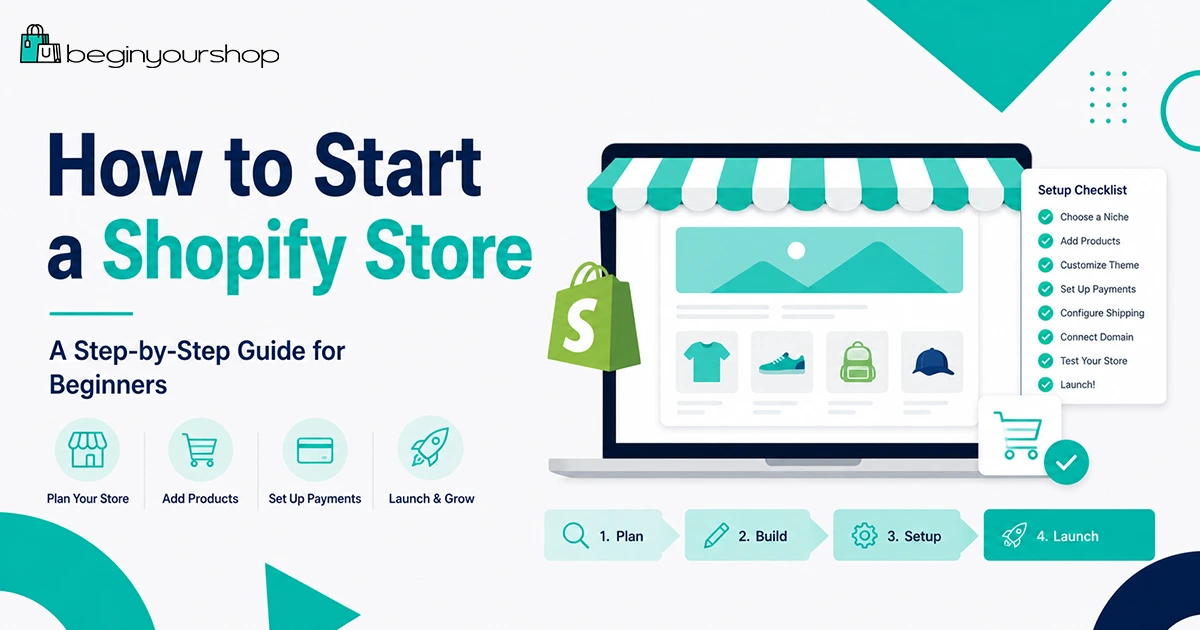
This guide walks you through how to start a Shopify store step by step, from the first planning decision to the final launch checklist.

Before You Start a Shopify Store

Before you click “start trial” and begin customizing a theme, take a short step back. The easiest Shopify stores to build are the ones with a clear starting point.

You do not need a perfect business plan, but you should be able to answer three basic questions:

  • What are you selling? Physical products, digital products, print-on-demand items, dropshipping products, handmade goods, subscriptions, or something else?
  • Who is the store for? Beginners often skip this, but knowing the customer makes product pages, images, pricing, and marketing much easier.
  • How will customers receive the product? You need to know whether you are shipping it yourself, using a supplier, using print-on-demand, offering local pickup, or delivering digitally.

Shopify can help with the technical setup, but it cannot decide your product strategy for you. A simple product idea with a clear customer is usually better than a complicated store with too many unrelated items.

Beginner tip: Start with a focused store. You can expand later, but your first launch should be easy to explain in one sentence.

1. Choose What You Want to Sell

The product decision affects almost every part of your Shopify setup: theme choice, product photos, shipping rules, payment options, return policy, app needs, and marketing strategy.

Common beginner-friendly product models include:

  • One-product store: Simple to build and easy to explain, but depends heavily on one offer.
  • Niche store: A small collection of related products for a specific audience.
  • Print-on-demand store: Products are created after purchase, often using a third-party fulfillment provider.
  • Dropshipping store: A supplier ships products directly to customers after orders are placed.
  • Handmade or in-house products: You control the product and brand, but you also handle production and fulfillment.
  • Digital products: No physical shipping, but you need delivery and access rules.

For a first Shopify store, avoid building a catalog with hundreds of products before you understand the platform. It is usually better to launch with a smaller selection, learn from real traffic, and improve over time.

What makes a good first product?

A good first product is not just something you like. It should be understandable, easy to present, and realistic to fulfill.

Look for products that meet several of these criteria:

  • The customer can understand the product quickly.
  • The product solves a clear problem or supports a clear desire.
  • You can get good photos or create good visuals.
  • The price leaves enough room for product cost, shipping, payment fees, and marketing.
  • The product is not too difficult to ship, return, or explain.
  • The product does not create legal, safety, medical, or compliance problems that you are not ready to handle.

2. Start Your Shopify Trial

Once you have a product direction, start your Shopify trial and create your store account. During the trial, your goal is not to make the store perfect. Your goal is to understand the Shopify admin, add real products, test the design, and decide whether Shopify fits your business.

When signing up, Shopify may ask basic onboarding questions about your business, selling experience, products, and preferred sales channels. Answer as accurately as you can. These questions help customize your setup experience, but you can adjust most store settings later.

If you are still comparing Shopify with other platforms, read our free trial guide first:

Shopify Free Trial Explained for Beginners

What to do immediately after creating your account

After you enter the Shopify admin, take a few minutes to understand the main areas:

  • Home: Setup prompts, store activity, and quick recommendations.
  • Products: Where you add and edit product listings.
  • Orders: Where customer orders appear after launch.
  • Customers: Customer records and account information.
  • Content: Files, metaobjects, blogs, and related content tools.
  • Online Store: Themes, pages, navigation, blog posts, and preferences.
  • Settings: Payments, shipping, taxes, domains, notifications, markets, policies, and other store-level settings.

Do not spend the entire trial changing colors. Start with products, store structure, payments, shipping, and launch readiness.

3. Set Up Your Store Basics

Before you add many products, configure the basic identity and operating details of your store.

In your Shopify admin, review these settings:

  • Store name: The public-facing name of your store.
  • Legal business name: The legal name used for business and payment records, if applicable.
  • Business address: Important for taxes, shipping, payment setup, and customer communication.
  • Store currency: The currency your store uses for product pricing.
  • Time zone and standards: Helpful for order records, reporting, and customer communication.
  • Sender email: The email address customers see in store emails.

If you are not legally registered as a business yet, you can still explore Shopify, but be careful before launching a store that collects payments. Your payment provider, tax obligations, and business structure can depend on your location and business model.

Important: Do not use fake business information in payment or billing settings. Payment providers may require accurate identity, address, bank, and business details.

4. Add Your Products

Products are the foundation of your Shopify store. A good product page does more than list a price. It explains what the product is, who it is for, why it matters, and what the customer receives.

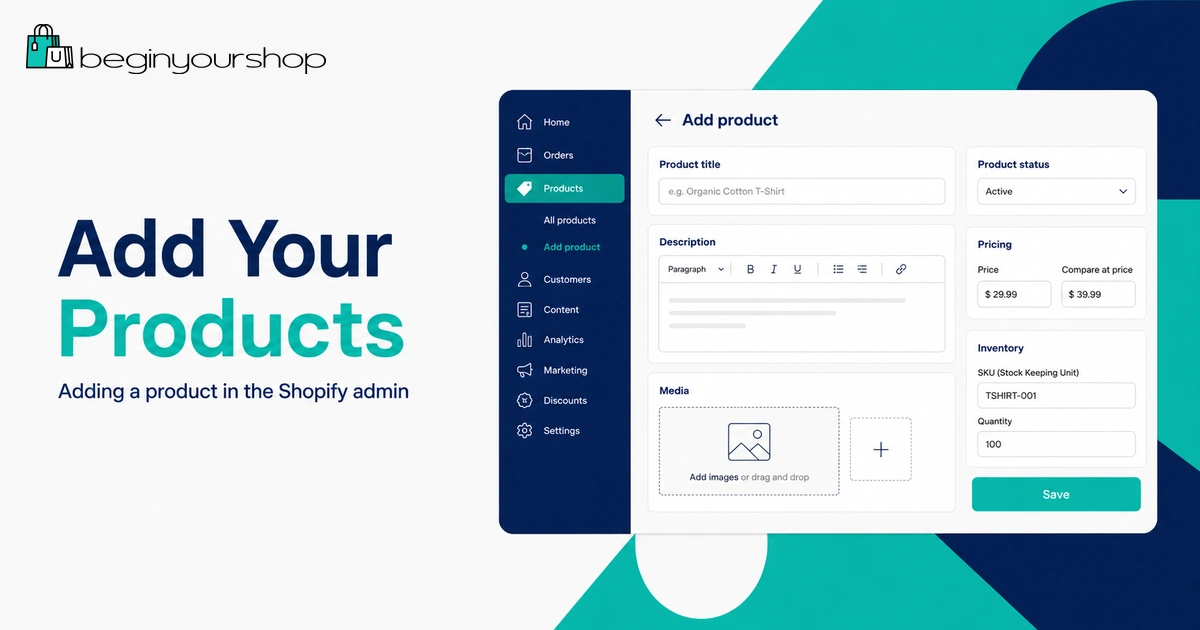
To add a product, go to Products in your Shopify admin and create a new product listing. Shopify’s product editor lets you add product titles, descriptions, media, pricing, inventory details, variants, product organization, and search engine information.

What to include on a product page

For each important product, include:

  • Product title: Clear, concise, and specific.
  • Product description: Explain benefits, use cases, materials, sizing, compatibility, or what is included.
  • Product images: Use clean product photos, lifestyle images, or mockups depending on your product type.
  • Price: Set a price that covers costs, payment fees, shipping assumptions, and profit margin.
  • Compare-at price: Use only when there is a legitimate discount.
  • Inventory: Track stock if you are managing inventory.
  • Shipping details: Add weight or fulfillment information if needed for shipping rates.
  • Variants: Add sizes, colors, materials, packs, or other options if customers choose between versions.
  • SEO title and description: Write a search-friendly title and meta description for important products.

Beginners often write product pages that are too short. If a customer needs to ask basic questions before buying, your page probably needs more detail.

Product page checklist

Element Beginner standard
TitleClear enough to understand without context.
DescriptionExplains benefits, details, use cases, and what is included.
ImagesShow the product clearly from multiple useful angles.
PriceCovers product cost, shipping assumptions, fees, and profit.
VariantsEasy to understand and not overly complicated.
Shipping infoWeight or delivery details are configured where needed.
Adding a product in the Shopify admin

5. Organize Products and Navigation

Once you have more than a few products, organize them so customers can browse your store without confusion.

In Shopify, products can be organized into collections. A collection is a group of products, such as “New Arrivals,” “Best Sellers,” “Women’s Shoes,” “Desk Accessories,” or “Starter Kits.”

There are two common collection types:

  • Manual collections: You choose which products belong in the collection.
  • Automated or smart collections: Shopify adds products based on conditions, such as product tag, price, vendor, product type, or other rules.

For beginners, manual collections are often easier at first. Automated collections become more useful when your store has a larger catalog and consistent product tagging.

Keep navigation simple

Your main menu should help customers find the most important parts of your store quickly. Do not overload the top navigation.

A simple beginner navigation might include:

  • Home
  • Shop
  • Best Sellers
  • About
  • Contact
  • Shipping & Returns

If you sell multiple categories, use clear collection names instead of clever names customers may not understand.

6. Choose and Customize a Theme

Your Shopify theme controls the visual structure of your storefront. It affects the homepage layout, product pages, collection pages, navigation, footer, typography, spacing, and many visual elements.

Shopify stores start with a default theme, and you can add free or paid themes from the Shopify Theme Store. Beginners should usually start with a free theme unless they have a clear reason to buy a paid one.

What to look for in a beginner-friendly theme

  • Clean product page layout
  • Good mobile presentation
  • Clear navigation
  • Simple homepage sections
  • Good image support
  • Fast enough for a small store
  • Fits your product type without heavy customization

Do not choose a theme only because the demo looks impressive. Theme demos often use professional photos, perfect copy, and ideal product catalogs. Your real store needs to look good with your actual products and content.

Customize the most important sections first

Instead of trying to customize everything, start with:

  • Header and navigation
  • Homepage hero section
  • Featured products or collections
  • Product page sections
  • Footer links
  • Brand colors and typography

The goal is not artistic perfection. The goal is clarity, trust, and a path to purchase.
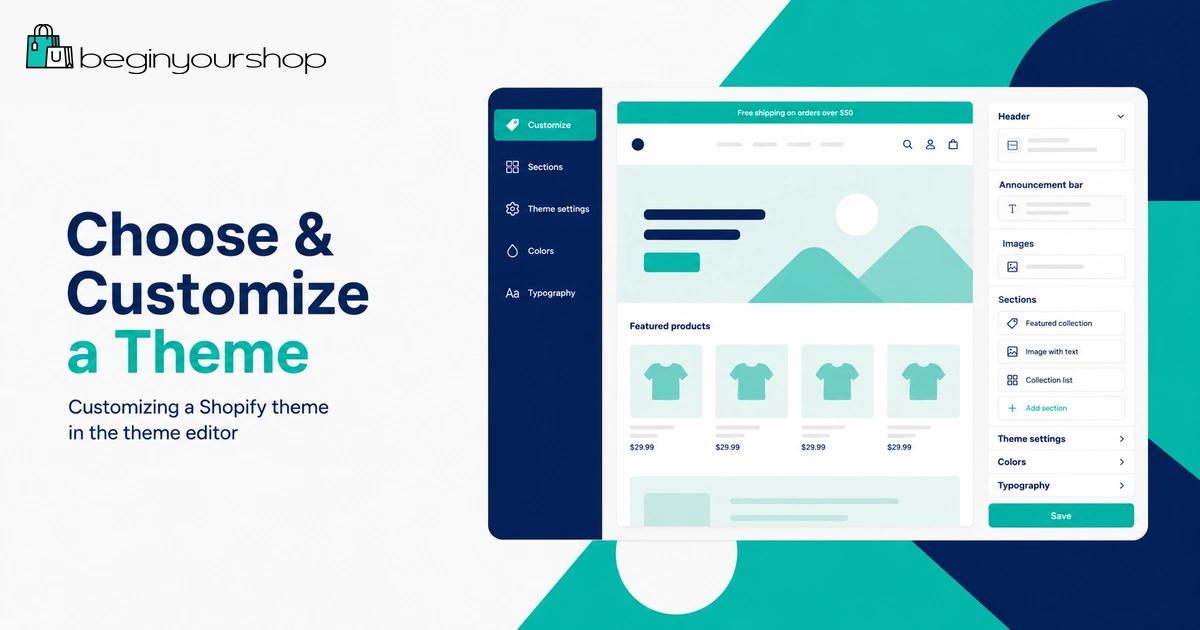
Customizing a Shopify theme in the theme editor

7. Create Essential Store Pages

Store pages help customers understand who you are, how your store works, and what to expect after ordering.

At minimum, create these pages before launch:

  • About: Explain your store, audience, mission, or product focus.
  • Contact: Tell customers how to reach you.
  • Shipping Policy: Explain shipping regions, processing times, estimated delivery, and any limitations.
  • Return and Refund Policy: Explain what can be returned, when, and how.
  • Privacy Policy: Explain how customer data is handled.
  • Terms of Service: Explain general store terms.

Shopify provides policy tools and templates in some languages, but you are responsible for making sure your policies fit your store, products, location, and legal obligations.

What makes store pages trustworthy?

Trustworthy pages are specific. Avoid vague policies like “shipping varies” or “contact us for returns” unless you explain exactly what that means.

Customers want to know:

  • How long orders take to process
  • Where products ship from
  • How shipping costs are calculated
  • Whether returns are accepted
  • How refunds are handled
  • How to contact support

8. Set Up Payments

Before customers can buy from your store, you need a way to accept payments.

Shopify Payments is Shopify’s built-in payment solution in supported countries and regions. It can let you accept credit cards and other payment methods while managing payments in your Shopify admin. Depending on your country, you may need to provide personal, business, tax, banking, and identity information.

If Shopify Payments is not available in your country or does not fit your business, you may be able to use a third-party payment provider. Available options depend on location, business type, currency, and provider rules.

Payment setup checklist

  • Check whether Shopify Payments is available in your country.
  • Review eligibility and prohibited business rules.
  • Add accurate business and identity details.
  • Add bank account or payout information where required.
  • Enable PayPal or other payment methods if appropriate.
  • Review checkout currency and tax implications.
  • Run a test order before launch.

Beginner tip: Payment setup can take longer than theme customization. Do not leave it until the day you plan to launch.

9. Set Up Shipping, Taxes, and Delivery Rules

Shipping is one of the most important parts of your store setup, especially if you sell physical products.

Your shipping setup should answer these questions:

  • Where do you ship?
  • Which products require shipping?
  • How much do customers pay for shipping?
  • Do you offer free shipping?
  • How long does processing take?
  • Do different countries, regions, or products need different rates?

In Shopify, shipping settings can include shipping zones, shipping rates, product weights, fulfillment locations, delivery methods, local pickup, and carrier-related options depending on your plan and location.

Simple shipping strategies for beginners

If you are new, keep shipping simple. Complicated rules can confuse customers and create support problems.

  • Flat-rate shipping: One shipping price for a region or order type.
  • Free shipping over a threshold: For example, free shipping over a certain order value.
  • Product-based shipping: Useful when some products are heavy, fragile, or oversized.
  • Local pickup: Useful for local businesses.

Tax settings depend on your business location, customer location, product type, and local requirements. If you are unsure, speak with a qualified tax professional before launching.

10. Connect a Domain

Every Shopify store receives a default myshopify.com address when it is created. For a real brand, you should use a custom domain such as yourbrand.com.

A custom domain helps customers recognize your store, makes your brand easier to share, and looks more professional in search results, email, and social media.

You can buy a domain through Shopify or connect a domain from another provider. After you add a domain, you can manage domain settings from the Domains area in your Shopify admin.

Domain setup tips

  • Choose a short, memorable domain if possible.
  • Avoid confusing spelling and unnecessary hyphens.
  • Use a domain that matches your store name closely.
  • Set your custom domain as the primary domain.
  • Set up a professional email address or forwarding if needed.

If your exact brand name is not available, choose clarity over cleverness. A slightly longer but understandable domain is usually better than a confusing one.

11. Install Only the Apps You Need

The Shopify App Store has apps for email marketing, reviews, subscriptions, upsells, bundles, shipping, analytics, loyalty programs, dropshipping, print-on-demand, and many other use cases.

Apps can be powerful, but beginners often install too many. Every app can add cost, complexity, and sometimes performance overhead.

Start with the minimum. You may not need many apps before your first launch.

Useful app categories for beginners

  • Email marketing or newsletter capture
  • Product reviews
  • Print-on-demand or fulfillment if your business model requires it
  • Customer support or chat
  • Analytics or conversion tracking
  • SEO helpers, if they solve a specific problem

Before installing an app, ask:

  • Does this solve a real problem I have right now?
  • Will this add monthly cost?
  • Does it slow down my storefront?
  • Can I remove it easily later?
  • Does the theme already include this feature?

12. Test Your Store Before Launch

Testing is not optional. Before you remove the password and send customers to your store, test the customer experience from beginning to end.
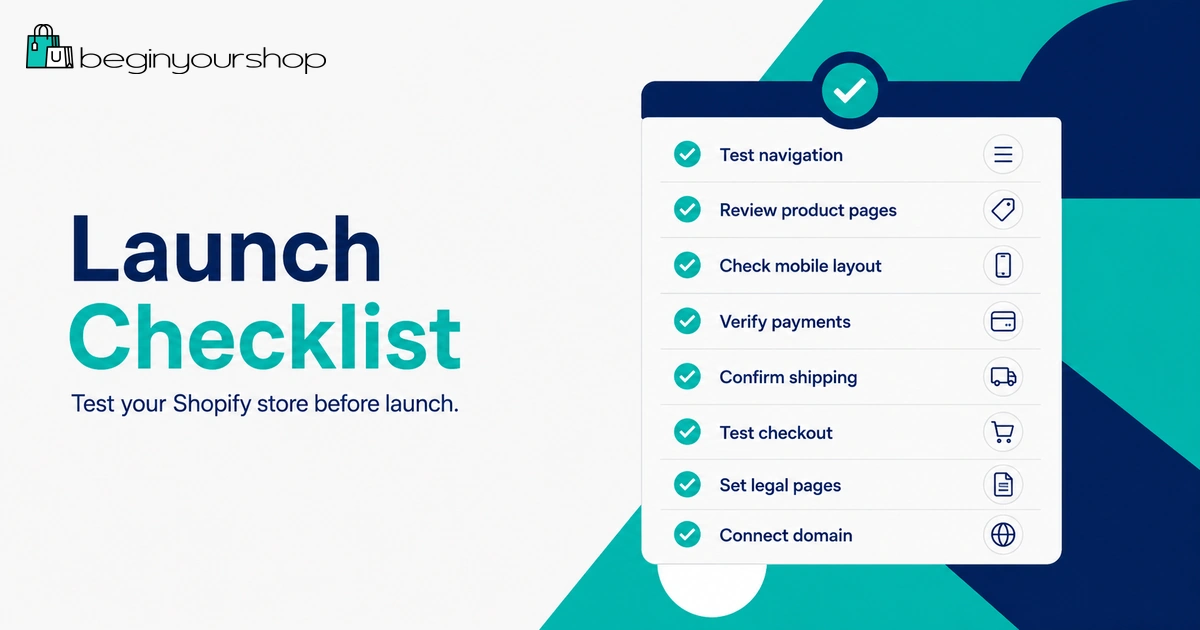
Shopify store launch checklist for beginners

At minimum, test:

  • Homepage links
  • Main menu and footer links
  • Collection pages
  • Product pages
  • Variant selection
  • Add-to-cart behavior
  • Cart page or drawer
  • Checkout flow
  • Discount codes
  • Shipping rates
  • Payment options
  • Order confirmation email
  • Mobile layout
  • Contact form or support email

If you use Shopify Payments, review Shopify’s test mode and payment testing guidance. If you use another provider, check whether that provider supports test transactions.

Pre-launch testing checklist

Area What to confirm
ProductsImages, prices, variants, descriptions, and stock are correct.
NavigationCustomers can reach products, policies, contact, and checkout.
CheckoutShipping, taxes, payment, and confirmation flow work correctly.
MobileMenus, buttons, images, and forms work on a phone screen.
PoliciesShipping, returns, privacy, and terms are visible and specific.

13. Launch Your Shopify Store

When your store is ready, choose the right Shopify plan, complete payment and shipping setup, test the checkout, and remove the online store password so customers can access the storefront.

Before launching, review one final time:

  • Products are visible and purchasable.
  • Collections and menus make sense.
  • Payment provider is active.
  • Shipping rates are clear.
  • Policies are published.
  • Contact information works.
  • Custom domain is connected and set as primary.
  • Password page is ready to remove.
  • Store has been tested on desktop and mobile.

Shopify stores are password protected during the free trial. When you are ready to launch, you typically need to choose a subscription plan before removing the password and making the store publicly available.

What to Do After Launch

Launching is not the end of the process. It is the beginning of learning from real visitors.

In the first week after launch, focus on:

  • Checking that orders and emails work correctly
  • Reviewing analytics and traffic sources
  • Watching for abandoned carts
  • Fixing unclear product descriptions
  • Improving product images
  • Answering customer questions quickly
  • Testing small marketing channels instead of trying everything at once

Do not panic if your store does not get sales immediately. Many new stores need several rounds of improvement before they convert consistently.

First 30 days after launch

During the first month, work on one improvement area at a time:

  • Week 1: Fix technical issues and checkout friction.
  • Week 2: Improve product pages and trust signals.
  • Week 3: Test one marketing channel.
  • Week 4: Review data and improve your offer.

Common Mistakes When Starting a Shopify Store

Mistake 1: Spending too much time on design

Design matters, but beginners often spend too much time adjusting colors and sections before the store has strong products, descriptions, shipping rules, and payment setup.

Mistake 2: Adding too many products

A huge catalog is harder to manage and harder for customers to understand. Start focused.

Mistake 3: Ignoring mobile users

Many customers will view your store from a phone. Test your homepage, product page, menu, cart, and checkout on mobile.

Mistake 4: Not testing checkout

You should know exactly what customers see before they pay. Test successful and failed flows where possible.

Mistake 5: Using unclear shipping and return policies

Customers hesitate when shipping times, return rules, or support options are vague.

Mistake 6: Installing apps too early

Apps should solve specific problems. Do not install apps just because another store uses them.

How to Start a Shopify Store: FAQ

Can I start a Shopify store with no experience?

Yes. Shopify is designed to be accessible for beginners, but you still need to learn the basics of products, pricing, shipping, payments, store policies, and marketing.

How long does it take to start a Shopify store?

A simple store can be set up in a few days, but a trustworthy store with good products, policies, payment setup, shipping rules, and testing often takes longer. The timeline depends on your product catalog, business model, and how prepared your assets are.

Do I need a business license to start a Shopify store?

This depends on your location, business structure, products, and local rules. Shopify lets you create a store, but legal and tax requirements are your responsibility. Check local requirements or speak with a qualified professional.

Can I start a Shopify store without inventory?

Yes, some models such as dropshipping, print-on-demand, and digital products can start without traditional inventory. However, you still need reliable fulfillment, clear product information, and realistic customer expectations.

Do I need a paid theme?

No. Many beginners can start with a free Shopify theme. A paid theme is only worth considering if it provides layout, features, or design options that your store truly needs.

Which Shopify plan should beginners choose?

Most beginners should start with the lowest plan that supports their needs, then upgrade later if the store grows. Review Shopify pricing and plan features before choosing.

Should I use Shopify apps right away?

Use apps only when they solve a real setup or business problem. Too many apps can increase costs and make your store harder to manage.

Can I launch during the Shopify free trial?

You can build and prepare your store during the trial, but to make the online store publicly accessible and fully launch, you typically need to choose a subscription plan and remove the storefront password.

What should I do before sending traffic to my store?

Make sure products, navigation, policies, shipping, payments, mobile layout, checkout, and contact options all work correctly. Sending traffic to an unfinished store can waste money and reduce trust.

Final Thoughts

Starting a Shopify store is easier when you follow a clear sequence. Do not begin with advanced apps, complicated branding, or too many products. Start with the fundamentals: product, theme, pages, payments, shipping, domain, testing, and launch.

The best first Shopify store is not perfect. It is clear, trustworthy, functional, and ready to improve based on real customer behavior.

If you want to build along while following this guide, start with Shopify’s trial, add your first product, choose a simple theme, and work through the launch checklist step by step.

Next recommended guide: Shopify Pricing Explained for Beginners

  • Hits: 316

Shopify Free Trial Explained for Beginners

Shopify free trial explained with $1 for 3 months offer

If you are thinking about starting an online store, Shopify’s free trial is one of the easiest ways to test the platform before paying for a full subscription.

The trial lets you explore Shopify, build your store, add products, customize your theme, and understand how the platform works before you fully commit. For many beginners, this is the best way to learn whether Shopify is the right ecommerce platform for their business idea.

As of 2026, Shopify’s official offer commonly includes a short free trial, followed by a promotional period where eligible users can continue for a low monthly price. Shopify currently advertises a free trial and a $1/month promotional offer for the first 3 months on its official pages. However, trial details and promotional offers can change based on region, account eligibility, signup timing, and Shopify’s current terms.

This guide explains how the Shopify free trial works, what you can do during the trial, what happens after the trial ends, and how to use your trial period wisely.

What Is the Shopify Free Trial?

The Shopify free trial is a temporary trial period that allows new users to create a Shopify account and start building an online store before choosing a regular paid plan.

During the trial, you can access the Shopify admin, explore store settings, add products, test themes, create collections, and prepare your store for launch.

The main purpose of the trial is simple: it gives you time to understand Shopify before deciding whether to continue with a paid plan.

This is useful if you are still asking questions like:

  • Is Shopify easy enough for beginners?
  • Can I build a store without coding?
  • How much does Shopify really cost?
  • What does the Shopify admin look like?
  • Can I add products and customize my store before paying?
  • Is Shopify better for my business than WooCommerce, Wix, Etsy, or Squarespace?

The free trial is not just a discount. It is a testing period. The best way to use it is to build as much of your store as possible before choosing a plan.

How Long Is the Shopify Free Trial?

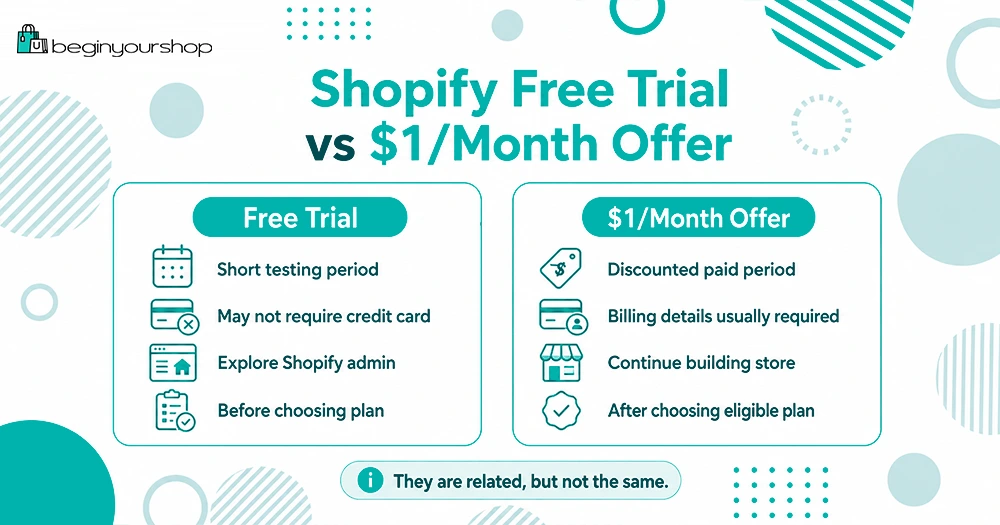
Shopify free trial compared with the $1 per month offer

Shopify currently promotes a free trial that lets new users try Shopify before selecting a paid plan. On Shopify’s official free trial page, Shopify states that users can try Shopify free for 3 days without a credit card.

After the free trial period, Shopify may offer an introductory promotion, such as $1/month for 3 months, depending on eligibility and the current offer available at signup.

Because Shopify promotions can change, you should always confirm the exact terms shown on Shopify’s official signup page before creating your account.

In practical terms, beginners should think of the offer in two stages:

  1. A short free trial to explore Shopify.
  2. A discounted introductory period after choosing an eligible plan.

This gives beginners enough time to test Shopify, build a store, and decide whether to continue.

Is Shopify Really $1 per Month?

Shopify currently advertises a promotional offer where eligible users can start for free and then continue for $1/month for 3 months. This offer is usually designed for new merchants who are starting a new Shopify store.

However, it is important to understand what “$1/month” means.

The $1/month offer usually refers to the Shopify subscription fee during the promotional period. It does not necessarily mean your entire business will cost only $1/month.

You may still have other costs, such as:

  • A custom domain name
  • Paid Shopify apps
  • Premium themes
  • Transaction or payment processing fees
  • Email marketing tools
  • Product samples
  • Inventory
  • Shipping supplies
  • Advertising costs

For a brand-new store, you can keep your early costs low by using a free Shopify theme, avoiding unnecessary apps, and focusing on the basics first.

The $1/month promotion can be a very affordable way to start, but it should not be treated as your complete business budget.

Do You Need a Credit Card for the Shopify Free Trial?

Shopify’s official free trial page states that you can try Shopify free for 3 days with no credit card required.

This means you can usually create an account and begin exploring Shopify without entering payment details immediately.

However, if you decide to continue after the free trial or activate a paid plan, you should expect to provide billing information. You may also need to select a plan before your store can fully go live and accept real orders.

For beginners, this is a good thing. You can test Shopify first, then decide whether it is worth continuing.

What Can You Do During the Shopify Trial?

The Shopify trial gives you access to many of the tools you need to build your store.

During the trial, you can usually:

  • Create your Shopify account
  • Access the Shopify admin
  • Add products
  • Create product collections
  • Customize your store theme
  • Set up basic pages
  • Explore Shopify settings
  • Configure payment options
  • Review shipping settings
  • Install and test apps
  • Preview your storefront
  • Prepare your store for launch

This is enough for most beginners to understand how Shopify works.

You do not need to wait until you have a perfect business idea. The trial period can help you test your idea, learn the platform, and decide whether you want to move forward.

What Can’t You Fully Do During the Trial?

The Shopify trial is powerful, but it does have limits.

In most cases, you will need to choose a paid plan before you can fully launch your store and start selling to customers. Until then, your store may not be fully public, and checkout may not be fully available for real transactions.

This is why many beginners make the same mistake: they start the trial, customize the homepage, add one or two products, and then stop.

A better approach is to treat the trial like a launch preparation window.

Use the trial to get your store ready. Then, if you are comfortable with Shopify, choose a plan and move toward launch.

How to Start a Shopify Free Trial

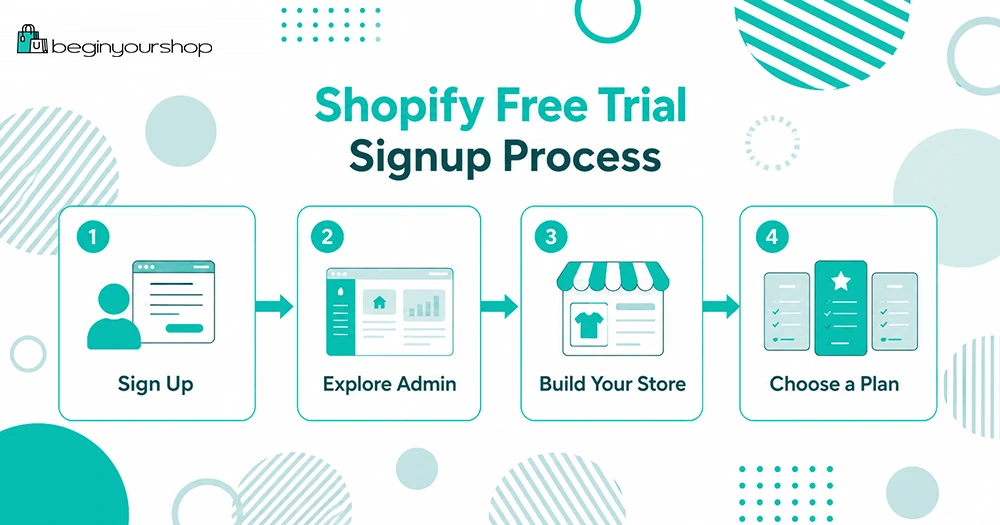
Shopify free trial signup process for beginners

Starting a Shopify trial is straightforward.

Here is the beginner-friendly process:

Step 1: Go to Shopify’s Trial Page

Start from Shopify’s official trial page or a trusted partner link.

Before signing up, check the offer shown on the signup page. Make sure you understand the free trial length, any promotional price, and what happens after the promotional period.

Step 2: Create Your Account

Shopify will ask you to create an account. You may need to enter basic information such as your email address and store details.

You do not need to have everything perfect at this stage. Your store name, product direction, and settings can usually be adjusted later.

Step 3: Answer Shopify’s Setup Questions

Shopify may ask questions about your business, such as whether you are already selling, what type of products you plan to sell, and where you want to sell.

These questions help Shopify customize the setup experience. If you are still unsure, answer as accurately as you can and continue.

Step 4: Enter the Shopify Admin

After creating your account, you will enter the Shopify admin.

This is where you manage your store. From the admin, you can add products, customize your theme, set up payments, configure shipping, manage orders, install apps, and update settings.

For beginners, the Shopify admin is one of the most important things to explore during the trial.

Step 5: Add Your First Product

Your first product does not have to be perfect. The goal is to understand how product pages work.

Add a product title, description, price, images, and basic product details.

A strong product page usually includes:

  • A clear product name
  • High-quality images
  • A simple description
  • Benefits and key features
  • Price
  • Shipping or delivery information
  • Trust-building details

Even if you are not ready to sell, adding a sample product helps you understand the Shopify workflow.

Step 6: Choose and Customize a Theme

Shopify themes control the design of your online store.

Beginners can start with a free Shopify theme. You do not need a paid theme at the beginning unless you have a specific design requirement.

Focus on clarity before advanced design. A simple store that is easy to understand is usually better than a complicated store with too many sections.

During the trial, customize:

  • Homepage sections
  • Logo
  • Colors
  • Fonts
  • Product page layout
  • Navigation menu
  • Footer links

Your goal is to make the store look trustworthy, not perfect.

Step 7: Create Basic Store Pages

Before launching, your store should have basic pages that help build trust.

At minimum, consider creating:

  • About page
  • Contact page
  • Shipping policy
  • Return policy
  • Privacy policy
  • Terms of service

These pages help customers understand who you are and how your store works.

They are also useful for building credibility with payment providers, advertising platforms, and search engines.

Step 8: Review Payments and Shipping

Payments and shipping are two areas beginners often ignore until the end.

During your Shopify trial, spend time reviewing:

  • Payment provider options
  • Shopify Payments availability
  • PayPal options
  • Shipping zones
  • Shipping rates
  • Tax settings
  • Checkout settings

You do not need to finalize everything immediately, but you should understand what needs to be configured before launch.

Step 9: Decide Whether to Choose a Paid Plan

After using the trial, decide whether Shopify is right for you.

Before choosing a plan, ask yourself:

  • Do I understand the Shopify admin?
  • Can I add and manage products?
  • Do I like the available themes?
  • Can I set up payments and shipping?
  • Does Shopify fit my business model?
  • Am I ready to keep building this store?

If the answer is yes, you can choose a Shopify plan and continue building.

If the answer is no, you can cancel or let the trial expire before committing.

What Happens When the Shopify Trial Ends?

When your free trial ends, you will usually need to choose a paid plan to continue using Shopify actively.

If you do not select a plan, your store may become frozen. This means you may not be able to continue editing or operating the store until you choose a plan.

Your store data may still be retained for a period of time, but you should not rely on a trial account as long-term storage. If you are serious about your store, make a decision before the trial ends.

If you decide Shopify is not right for you, review Shopify’s cancellation instructions and make sure you do not continue into a paid plan unintentionally.

Which Shopify Plan Should Beginners Choose?

Most beginners should start with Shopify’s entry-level plan unless they already know they need advanced features.

For many new stores, the Basic plan is enough to begin.

A beginner usually does not need the most advanced Shopify plan on day one. It is better to start simple, launch your store, learn from real visitors, and upgrade later if your business grows.

You may want to compare plans based on:

  • Monthly cost
  • Staff accounts
  • Reporting features
  • Shipping features
  • Transaction fees
  • International selling needs
  • Inventory locations
  • Business growth stage

If you are still unsure, read our full Shopify pricing guide before choosing a plan.

Read our Shopify pricing guide

How to Use the Shopify Trial Wisely

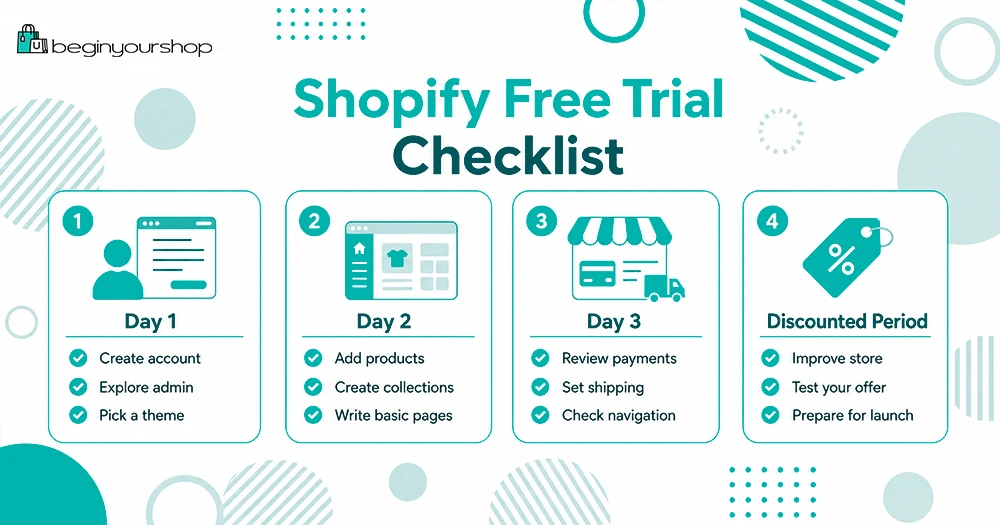
Shopify free trial checklist for setting up a store

The biggest mistake beginners make is treating the trial as “extra time” instead of a focused setup period.

You should use your trial with a clear plan.

Here is a simple trial checklist:

  • Day 1: Create your account, explore the admin, and choose a theme.
  • Day 2: Add products, create collections, and write basic store pages.
  • Day 3: Review payments, shipping, navigation, and launch readiness.
  • Discounted period: Continue improving your store, test your offer, and prepare for real traffic.

If you qualify for a discounted introductory period, use it to build momentum. Do not spend three months changing colors and fonts. Focus on creating a store that can actually sell.

Common Shopify Trial Mistakes

Mistake 1: Waiting Too Long to Start Building

Some people create a trial account and then do nothing for several days.

The trial starts when you sign up, not when you begin working on your store. If you are going to start a trial, make sure you have time to use it.

Mistake 2: Spending Too Much Time on the Logo

A logo matters, but it should not stop you from building your store.

You can start with a simple text logo and improve branding later.

Mistake 3: Installing Too Many Apps

Apps can be useful, but too many apps can slow down your store, increase costs, and make setup more confusing.

Beginners should only install apps they truly need.

Mistake 4: Ignoring Product Pages

Your product pages are more important than your homepage.

A beautiful homepage will not help much if your product pages are unclear, incomplete, or untrustworthy.

Mistake 5: Not Reviewing Total Costs

The Shopify subscription is only one part of your cost.

Before launching, consider domains, apps, themes, payment fees, marketing, products, and shipping.

Mistake 6: Choosing a Plan Without Understanding Your Needs

Do not choose the most expensive plan just because it seems more professional.

Start with the plan that fits your current stage. You can upgrade later.

Is Shopify Good for Beginners?

Yes, Shopify is one of the most beginner-friendly ecommerce platforms because it is hosted, structured, and designed specifically for online selling.

You do not need to manage web hosting, install ecommerce software, or maintain your own checkout system. Shopify gives you a built-in admin, store builder, checkout, payment options, theme system, app ecosystem, and order management tools.

That does not mean Shopify does everything for you.

You still need to choose products, write descriptions, upload images, set prices, configure shipping, create policies, and market your store.

Shopify makes the technical side easier. It does not remove the business work.

Is the Shopify Free Trial Worth It?

The Shopify free trial is worth using if you are serious about testing an ecommerce idea.

It is especially useful if:

  • You are new to ecommerce.
  • You want to build a store without coding.
  • You want to compare Shopify with other platforms.
  • You want to understand Shopify pricing before committing.
  • You need a simple way to test a product idea.
  • You want to prepare your store before paying full price.

The trial is less useful if you are not ready to take action. If you do not have time to explore the admin, add products, and test the setup process, you may waste the trial period.

Before starting, set aside time to work on your store.

Shopify Free Trial FAQ

Does Shopify still have a free trial?

Yes. Shopify currently promotes a free trial for new users. Trial length and promotional pricing can change, so always check Shopify’s official signup page for the latest terms before creating your account.

Is Shopify free for 3 months?

Shopify’s current promotion may include a discounted introductory period, such as $1/month for 3 months, after the initial free trial. This is not the same as being completely free for 3 months.

Can I sell during the Shopify free trial?

You can build and prepare your store during the trial. To fully launch and accept real customer orders, you will usually need to choose a paid plan and complete your payment setup.

Do I need a credit card to start the Shopify free trial?

Shopify’s official free trial page currently says no credit card is required to start the free trial. However, payment details may be required if you choose a paid plan after the trial.

What happens if I cancel during the trial?

If you decide not to continue and have not selected a paid plan, your account may be frozen after the trial ends. Review Shopify’s cancellation and billing settings inside your account if you are unsure.

Which Shopify plan is best for beginners?

Most beginners should start with the lowest plan that supports their needs. For many new stores, the Basic plan is enough at the beginning. You can upgrade later as your business grows.

Can I change my Shopify store name later?

You can usually change parts of your store branding later, including your displayed store name. However, your original Shopify subdomain may be harder to change, so choose carefully when creating your account.

Can I use a custom domain during the trial?

You can explore domain settings during the trial. If you want a professional store, you should eventually use a custom domain instead of relying only on the default Shopify subdomain.

Should I start with a free theme?

Yes. Most beginners should start with a free Shopify theme. A free theme is usually enough to launch a clean and professional-looking store.

Should I use paid apps during the trial?

Be careful with paid apps. Some apps may create charges after the trial or billing period. Only install apps that are necessary for your store.

Final Thoughts

The Shopify free trial is a useful starting point for beginners who want to test Shopify before paying for a full subscription.

Use the trial to explore the admin, add products, customize your theme, create basic pages, and understand how Shopify works. If you qualify for a discounted introductory offer, use that time to prepare your store carefully and move toward launch.

The most important thing is not just getting the trial. It is using the trial well.

If you are ready to start building your store, you can begin with Shopify’s trial and follow a step-by-step setup process.

Next recommended guide: How to Start a Shopify Store

  • Hits: 680

Contact

Have a question, correction, or suggestion for Begin Your Shop? You can use this page to get in touch with us.

We read messages related to Shopify beginner guides, pricing explanations, free trial information, platform comparisons, article corrections, and general website feedback.

Contact Begin Your Shop

For general questions, corrections, or content suggestions, please contact us using the form below or send an email to:

Email: This email address is being protected from spambots. You need JavaScript enabled to view it.

If you use a different support email, replace this email address before publishing.

What You Can Contact Us About

We welcome useful messages related to this website and its content. Good reasons to contact us include:

  • Reporting an outdated Shopify price, plan name, feature, or trial detail
  • Suggesting a topic for a future beginner guide
  • Pointing out a broken link or formatting issue
  • Asking about one of our Shopify guides or comparisons
  • Sending feedback about how to make our content clearer
  • Business, partnership, or editorial inquiries

Important: Begin Your Shop is an independent informational website. We are not Shopify and cannot access your Shopify account, billing, store admin, orders, customer data, or support tickets.

For Shopify Account or Billing Support

If your question is about your Shopify account, billing, store access, payment setup, order processing, or technical issues inside Shopify, you should contact Shopify directly through Shopify’s official support channels.

Examples of questions that should go to Shopify support include:

  • You cannot log in to your Shopify account
  • You have a billing or subscription issue
  • Your store is frozen or unavailable
  • You need help with Shopify Payments verification
  • You need help with a specific Shopify order or customer record
  • You need official confirmation about current Shopify offers or plan eligibility

We can explain Shopify concepts in our guides, but we cannot provide account-specific support.

Content Corrections

Shopify plans, pricing, payment fees, app features, and promotional offers can change. We try to keep our core pages accurate, but some information may become outdated over time.

If you notice something that appears incorrect, please include:

  • The page URL
  • The section or sentence that may be outdated
  • The correction you suggest
  • A link to the official source, if available

This helps us review and update the page more efficiently.

Partnership and Editorial Inquiries

We are open to relevant partnership and editorial inquiries that fit the purpose of Begin Your Shop.

However, we do not accept misleading offers, spammy link exchanges, irrelevant guest posts, or requests to publish content that does not help beginners make better ecommerce decisions.

If your message is about a partnership, please clearly explain:

  • Who you are
  • What company or website you represent
  • What type of collaboration you are proposing
  • Why it would be useful for Begin Your Shop readers

Response Time

We do our best to review relevant messages, but we may not be able to respond to every inquiry.

Messages that are clear, specific, and related to Begin Your Shop are more likely to receive a response. Spam, unrelated pitches, and vague outreach may be ignored.

Contact Form Placeholder

If you are using a Joomla contact form extension or a YOOtheme Pro form module, place the form module here.

Example module shortcode:

<div>{loadmoduleid YOUR_CONTACT_FORM_MODULE_ID}</div>

Replace this placeholder with your actual contact form module, or remove this block if you only want to show an email address.

Privacy Note

Please do not send sensitive personal information, account passwords, Shopify billing details, customer records, payment information, or confidential business documents through this contact page.

For more information about how this website handles information, please read our Privacy Policy.

You can also review our Affiliate Disclosure to understand how affiliate links may be used on this website.

  • Hits: 123

Begin Your Shop is a beginner-friendly resource for people who want to start an online store with Shopify but do not want to waste time guessing what to do first.

Starting an ecommerce store can feel simple on the surface: choose a platform, add products, pick a theme, and launch. In reality, beginners often get stuck on the same questions:

  • Is Shopify the right platform for my store idea?
  • How does the Shopify free trial actually work?
  • Which Shopify plan should I choose?
  • What does it really cost to start a Shopify store?
  • What should I set up before launching?
  • How do I avoid common beginner mistakes?

Begin Your Shop exists to answer those questions clearly, step by step.

Our Mission

Our mission is to help beginners make better decisions before and during the process of starting a Shopify store.

We focus on practical guides, pricing explanations, setup checklists, platform comparisons, and beginner-friendly ecommerce advice. The goal is not to make Shopify sound perfect for everyone. The goal is to help you understand whether Shopify fits your needs and how to use it more confidently if it does.

What We Cover

Begin Your Shop focuses on the early stages of building an online store. Our content is designed for people who are still researching, comparing, planning, or setting up their first store.

Shopify Free Trial

Clear explanations of how Shopify trials, introductory offers, and first steps work for beginners.

Shopify Pricing

Guides to Shopify plans, payment fees, app costs, themes, domains, and realistic startup budgets.

Store Setup

Step-by-step help for products, themes, payments, shipping, policies, domains, and launch preparation.

Platform Comparisons

Practical comparisons between Shopify and other ecommerce platforms so you can choose more confidently.

Beginner Guides

Simple tutorials and checklists for people who are new to ecommerce and online selling.

Common Mistakes

Advice to help beginners avoid overspending, overcomplicating setup, or launching before the store is ready.

Who This Site Is For

Begin Your Shop is written for beginners and early-stage store owners, including:

  • People who are thinking about starting their first online store
  • Creators who want to sell products online
  • Small business owners exploring ecommerce
  • Side hustlers comparing Shopify with other platforms
  • New Shopify users who need a simple launch plan
  • Anyone trying to understand Shopify pricing before choosing a plan

If you already run a large ecommerce operation, some of our beginner content may be too basic. If you are just starting, that is exactly who we write for.

How We Create Content

Our content is designed to be practical, structured, and easy to follow. We aim to explain Shopify topics in plain English without assuming that readers already understand ecommerce terminology.

When creating guides, we try to:

  • Focus on beginner search intent and real setup questions
  • Separate facts from recommendations
  • Use cautious wording when pricing, offers, or platform rules may change
  • Recommend simple starting points before advanced tools
  • Explain trade-offs instead of pretending one option is always best
  • Update important pages when Shopify plans, offers, or features change

Important note: Shopify pricing, trial offers, plan names, features, and availability can change. We do our best to keep core pages current, but you should always confirm the latest details on Shopify’s official website before making a purchase or choosing a plan.

Our Approach to Recommendations

Begin Your Shop may earn commissions from affiliate links. That means we may receive compensation if you click a link on our site and sign up for a product or service.

Affiliate relationships do not change the purpose of our content. Our goal is to help readers understand the topic and make a better decision. We do not recommend choosing a higher Shopify plan just because it costs more, and we do not suggest paid tools unless they solve a real problem.

For most beginners, our advice is usually simple:

  • Start with the lowest plan that fits your current needs.
  • Use a free theme before paying for a premium one.
  • Install fewer apps at the beginning.
  • Focus on product clarity, trust, checkout, shipping, and launch readiness.
  • Upgrade only when your store has a real reason to upgrade.

You can read more on our Affiliate Disclosure page.

What Begin Your Shop Is Not

Begin Your Shop is an independent informational website. We are not Shopify, and we do not represent Shopify officially.

We also do not provide legal, tax, accounting, financial, or professional business advice. Ecommerce requirements can vary depending on your location, business structure, product type, payment provider, and customers. For legal, tax, or financial decisions, speak with a qualified professional.

Start Here

If you are new to Shopify, these pages are the best places to begin:

Shopify Free Trial

Learn how the Shopify trial works and what beginners should do during the trial period.

Read the guide

Shopify Pricing

Understand plans, fees, extra costs, and which Shopify plan beginners should usually choose.

Compare pricing

Start a Shopify Store

Follow a step-by-step beginner guide from store idea to launch checklist.

Start learning

Contact

If you have a question, correction, or suggestion, please visit our Contact page.

We appreciate feedback that helps make Begin Your Shop more accurate, useful, and beginner-friendly.

Shopify Pricing Explained

Shopify Pricing Explained

Shopify pricing can look simple at first: choose a plan, pay the monthly subscription, and start selling. In practice, the real cost of Shopify includes more than the plan price. You also need to understand payment processing fees, third-party transaction fees, app costs, themes, domains, POS costs, shipping tools, and the difference between monthly and yearly billing.

This guide explains Shopify pricing for beginners in plain English. It covers the main Shopify plans, what each plan is best for, how payment fees work, which extra costs to expect, and how to choose the right plan without overspending.

Last checked: May 8, 2026. Shopify pricing, offers, fees, and plan names can change by country, currency, billing cycle, eligibility, and time. Always confirm the latest terms on Shopify’s official pricing page before choosing a plan.

Quick Answer

For most beginners, the best Shopify plan to start with is the Basic plan. It is usually enough for a new online store that is run by one person and does not need advanced reporting, multiple staff accounts, or enterprise-level features.

Best for most beginners

Basic

Start here if you are launching your first Shopify store and want to keep fixed monthly costs low.

Best for small teams

Grow

Consider this when you need staff accounts, lower card rates, or more room to manage a growing business.

Best for scaling

Advanced

Use this when you need advanced features, lower fees, more staff accounts, and global selling tools.

The cheapest plan is not always the cheapest overall. If you process many sales, payment rates and third-party transaction fees can matter more than the subscription price. But for a new store with little or no sales volume, fixed monthly cost usually matters most.

Shopify Pricing Overview

Shopify’s main ecommerce plans are designed for different stages of business growth:

  • Basic: For solo entrepreneurs and new stores.
  • Grow: For small teams and growing businesses.
  • Advanced: For businesses with more complex reporting, shipping, staff, and international needs.
  • Plus: For complex, high-volume, or enterprise businesses.

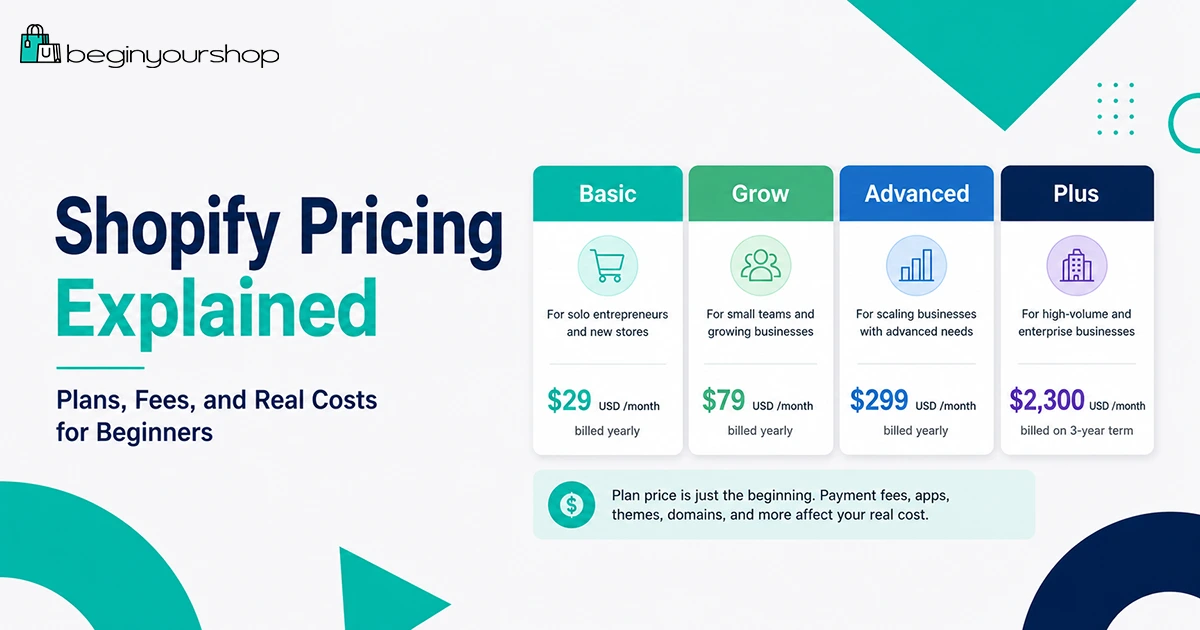
As of the latest checked official pricing, Shopify lists yearly billed prices starting at $29 USD/month for Basic, $79 USD/month for Grow, $299 USD/month for Advanced, and $2,300 USD/month for Plus on a 3-year term. Shopify also displays promotional offers such as a free trial and a low introductory price for eligible users. These offers can change.

Pricing note: The prices in this article use Shopify’s U.S. pricing page as the reference point. Your price can differ based on country, currency, taxes, billing cycle, and current promotion.

Shopify Plan Comparison Table

The table below summarizes the main Shopify plans from a beginner’s perspective.

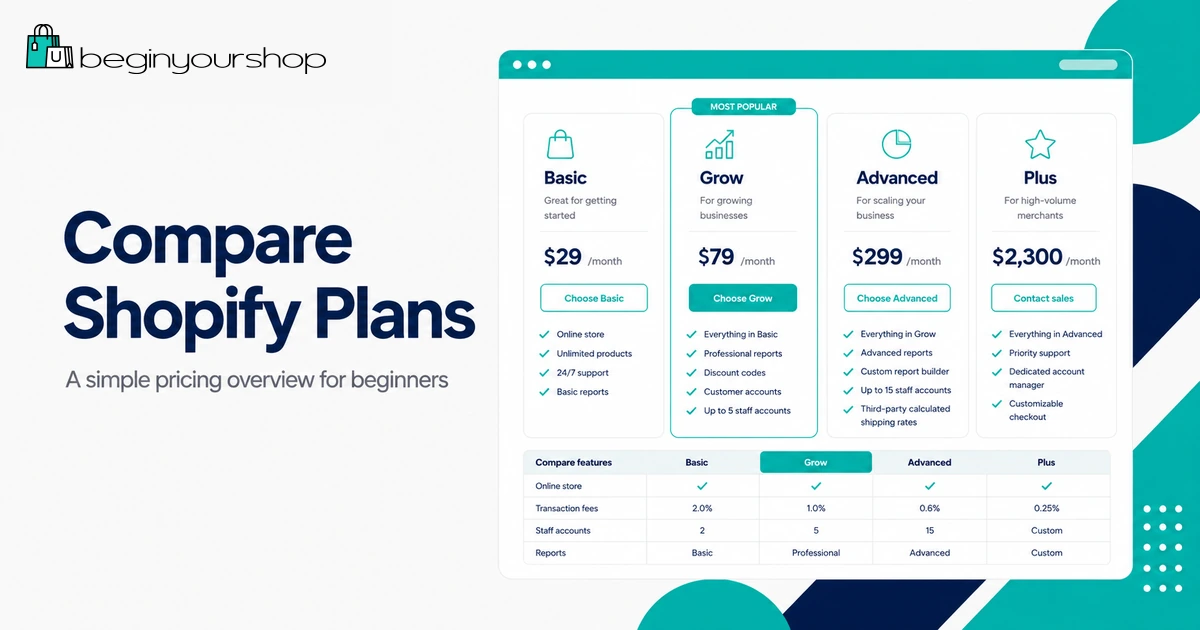
Shopify pricing plans comparison page
Plan Starting price Best for Online card rate from In-person card rate from Third-party transaction fee Key feature notes
Basic $29 USD/month billed yearly Solo entrepreneurs and first stores 2.9% + 30¢ USD 2.6% + 10¢ USD 2% Good starting point for most beginners.
Grow $79 USD/month billed yearly Small teams and growing stores 2.7% + 30¢ USD 2.5% + 10¢ USD 1% Includes up to 5 staff accounts and lower card rates.
Advanced $299 USD/month billed yearly Businesses with global reach or advanced needs 2.5% + 30¢ USD 2.4% + 10¢ USD 0.6% Includes up to 15 staff accounts, live third-party shipping rates, and regional tools.
Plus Starting at $2,300 USD/month billed yearly on a 3-year term High-volume and complex businesses Best rates for high-volume merchants Varies Varies by setup and location Custom checkout, B2B, unlimited staff accounts, and enterprise support.

Do not choose a plan based only on the plan name. Choose based on your real needs: how many people manage the store, how many sales you process, which payment provider you use, whether you need advanced reporting, and whether your store is selling internationally.

How Shopify Billing Works

Shopify pricing has several parts. Beginners often only look at the subscription price, but your total bill can include other charges.

1. Subscription fee

This is the recurring cost of your Shopify plan. It gives you access to the Shopify platform, admin, hosted storefront, checkout, product tools, theme system, and plan-level features.

2. Billing cycle

Shopify usually lets merchants choose between monthly and yearly billing on the main plans. Yearly billing can offer a discount on select plans, but it requires a larger upfront commitment.

If you are testing a business idea and cash flow is tight, monthly billing can be safer. If you are confident you will use Shopify for the full year, yearly billing can reduce the monthly equivalent cost.

3. Promotional pricing

Shopify may offer a free trial and a discounted introductory period. Promotional offers are useful, but they should not be treated as your long-term operating cost.

Before choosing a plan, look at the price after the promotion ends. That is the number you need to budget for.

4. Payment processing fees

When a customer pays with a card or supported payment method, payment processing fees apply. These fees vary by plan, payment method, card type, country, and whether the transaction is domestic, international, online, or in person.

5. Third-party transaction fees

If you use a third-party payment provider instead of Shopify Payments, Shopify may charge additional third-party transaction fees. These are separate from the fees your payment provider charges.

6. App, theme, domain, and service costs

Your Shopify subscription is not always your only cost. Many stores also pay for apps, a domain, premium themes, email tools, product review tools, shipping tools, accounting tools, design services, or marketing tools.

Basic Plan

The Basic plan is the best starting point for most new Shopify stores. It is designed for solo entrepreneurs and smaller stores that want to sell online without paying for advanced features too early.

Choose Basic if:

  • You are launching your first Shopify store.
  • You are working alone or do not need multiple staff accounts.
  • You want to keep fixed monthly costs low.
  • You do not need advanced reporting yet.
  • You are still testing products, positioning, and marketing channels.

Basic is not “basic” in the sense of being unusable. It can support a real online store. You can add products, customize your theme, accept payments, manage orders, create policies, connect a domain, and start selling.

The main reason to move beyond Basic is not status. It is business need. Upgrade when the additional features or lower payment rates justify the higher monthly cost.

Grow Plan

The Grow plan is meant for businesses that have moved beyond the solo beginner stage. It can make sense when your store has more consistent sales, more operational needs, or multiple people helping manage the business.

Consider Grow if:

  • You need staff accounts for team members.
  • You want lower card rates than Basic.
  • Your store has consistent sales volume.
  • You need better reporting or operational features.
  • Your business has enough revenue to justify the higher subscription cost.

The key question is whether Grow saves or earns more than it costs. If you process enough sales, lower payment rates may reduce total fees. If you need staff access, Grow can also be operationally necessary.

When Grow may not be worth it yet

If your store has low sales volume and you work alone, Grow may add cost without adding enough practical benefit. In that case, Basic is usually the better starting point.

Advanced Plan

The Advanced plan is built for stores with more complex needs. It can be useful for businesses that need more staff accounts, more advanced selling capabilities, lower card rates, live third-party shipping rates, or stronger international tools.

Consider Advanced if:

  • You have a team managing operations, fulfillment, marketing, and support.
  • You process enough sales that lower card rates matter.
  • You need live third-party shipping rates.
  • You sell across regions and need more flexibility.
  • You need a stronger operational setup before considering Shopify Plus.

Advanced is usually not the right first plan for a beginner. It becomes more logical when your store has real sales, real operational complexity, and a clear need for the features.

Shopify Plus

Shopify Plus is Shopify’s enterprise-level plan for high-volume, complex, or fast-scaling businesses. It is not designed for most beginners.

Shopify Plus can include advanced features such as customizable checkout, B2B and wholesale selling, unlimited staff accounts, advanced automation options, and priority support. It can be valuable for larger brands, but the cost and commitment are much higher than the standard plans.

Beginners should not choose Plus unless they already have a business case for it. If you are just starting, focus on building a clear store, validating products, and getting your first sales.

Payment Fees and Transaction Fees

Payment fees are often the most misunderstood part of Shopify pricing. There are two different fee categories beginners should understand:

  • Payment processing fees: Fees charged for processing customer payments.
  • Third-party transaction fees: Additional Shopify fees that can apply when using third-party payment providers instead of Shopify Payments.

Shopify Payments

Shopify Payments is Shopify’s built-in payment processor in supported countries and regions. If Shopify Payments is available for your business and you use it as your processor, you generally avoid Shopify’s third-party transaction fees for orders processed through Shopify Payments.

You still pay payment processing fees. Those fees vary depending on your plan, card type, transaction type, and location.

Third-party payment providers

If you use a third-party payment provider, you may pay both:

  • The payment provider’s own processing fees.
  • Shopify’s third-party transaction fee for your plan.

This is why a third-party payment provider can be more expensive than it looks at first. It may still be necessary if Shopify Payments is not available in your country, does not support your business type, or you need a specific payment provider.

Simple fee example

Imagine your store receives a $100 online card order. Depending on your plan and payment setup, you may pay a percentage fee plus a fixed fee. If you use a third-party provider, you may also pay the third-party transaction fee on top of your provider’s processing cost.

Scenario What you may pay Beginner takeaway
Using Shopify Payments Payment processing fee based on plan and transaction type Usually simpler if available and eligible.
Using a third-party provider Provider fee plus possible Shopify third-party transaction fee Check total fees before choosing this route.
International cards or currency conversion Additional fees may apply depending on location and payment type International selling can change your real cost per order.

Extra Shopify Costs to Expect

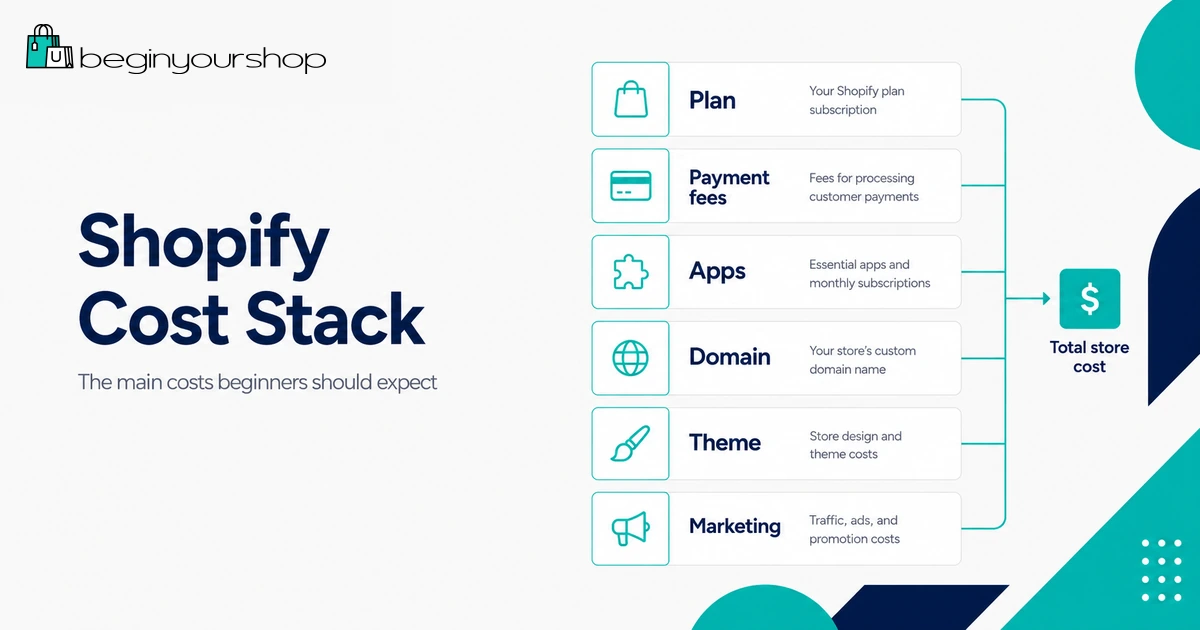
Shopify’s plan price is only one part of your store budget. Below are common extra costs beginners should expect.

Shopify cost stack including plan, payment fees, apps, domain, theme, and marketing

Domain name

Your store can use a free myshopify.com domain, but a real brand should usually use a custom domain. You can buy a domain through Shopify or connect one from another provider.

Theme costs

Shopify provides free and paid themes. Many beginners can launch with a free theme. A premium theme may be useful later if it gives you layout options, product page features, or design flexibility you truly need.

App costs

Apps can add reviews, email marketing, subscriptions, bundles, upsells, fulfillment tools, SEO helpers, print-on-demand services, analytics, and many other features.

Apps are useful, but they are also one of the easiest ways to increase monthly cost. Avoid installing apps until you know what problem they solve.

Email marketing tools

You may eventually need email capture, newsletters, abandoned cart campaigns, and customer segmentation. Some tools have free tiers; others charge by subscriber count or usage.

POS costs

If you sell in person, Shopify POS may add costs depending on your setup. Shopify lists POS Pro as a separate option for advanced retail features.

Shipping and fulfillment tools

Some stores can manage shipping with Shopify’s built-in tools. Others need apps or external services for fulfillment, labels, tracking, pickup, or international shipping.

Taxes and accounting

Depending on your location and business model, you may need accounting software, tax tools, or professional help. These costs are not always part of Shopify, but they are part of running a store.

Product and marketing costs

Your largest costs may not be software. Inventory, product samples, packaging, photos, influencer samples, ads, email campaigns, and content creation can be more significant than the Shopify plan itself.

Realistic Shopify Budget Examples

The numbers below are examples, not guarantees. They are meant to help you think about budget categories.

Budget type Likely setup Monthly software cost Other costs to expect Best for
Lean beginner Basic plan, free theme, few or no paid apps Lowest ongoing setup Domain, product samples, payment fees, possible email tool Testing a first store idea.
Serious launch Basic or Grow, custom domain, selected apps Moderate Apps, product photos, email marketing, inventory or fulfillment costs Launching a real brand with a clear product plan.
Growth stage Grow or Advanced, multiple apps, team workflows Higher Marketing, support, fulfillment, accounting, analytics, team costs Stores with consistent sales and operational needs.

Beginner monthly cost stack

A beginner Shopify budget might include:

  • Shopify plan subscription
  • Payment processing fees
  • Domain name
  • One or two essential apps
  • Email marketing or newsletter tool
  • Product samples or inventory
  • Shipping supplies or fulfillment costs
  • Marketing budget

Do not spend your entire budget on software. A store also needs products, content, traffic, and trust.

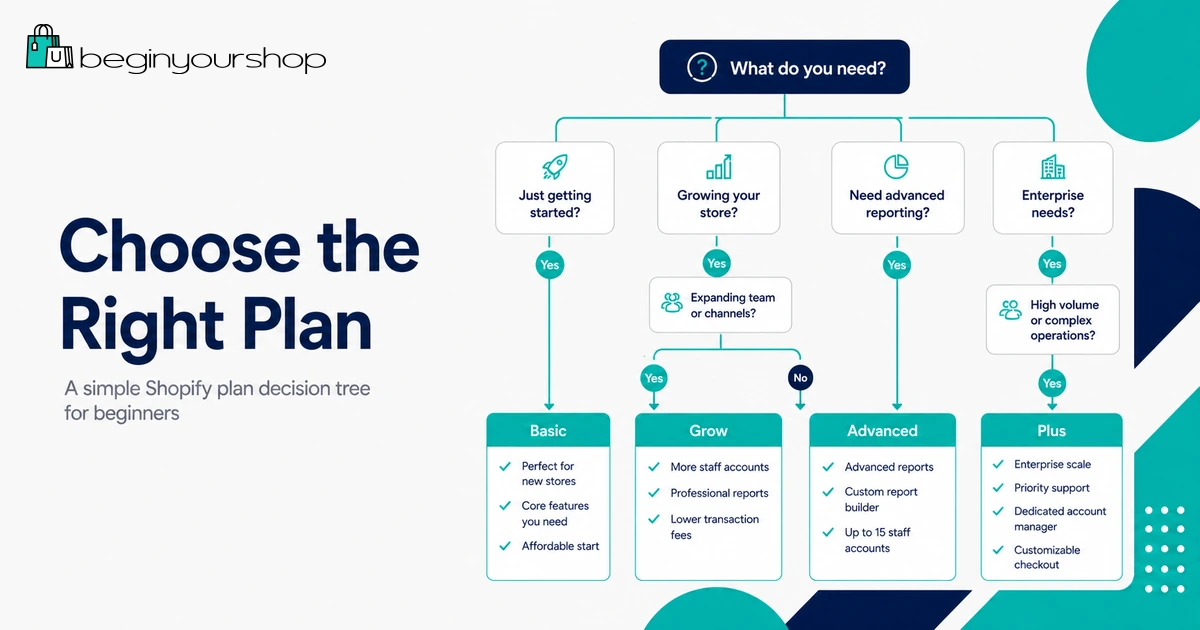
Which Shopify Plan Should Beginners Choose?

Most beginners should start with Basic, unless there is a clear reason not to.

Shopify plan decision tree for beginners

Beginner decision rule

  • Choose Basic if you are launching your first store and working alone.
  • Choose Grow if you need staff accounts or your sales volume justifies lower card rates.
  • Choose Advanced if you need advanced shipping, more staff accounts, or regional/global selling features.
  • Choose Plus only if your business is already complex or high-volume.

If you are unsure, begin with Shopify’s trial, build the store, understand the admin, and compare plan features before committing to a long billing cycle.

Read our Shopify free trial guide

How to Keep Shopify Costs Low

Keeping costs low does not mean building a weak store. It means spending only where the cost supports your business.

Start with a free theme

Use a free Shopify theme until you know exactly what a paid theme would improve.

Limit paid apps

Every app should have a job. If an app does not help customers buy, help you fulfill orders, or help you measure performance, wait before installing it.

Use Shopify Payments if it fits your business

If Shopify Payments is available and suitable for your business, it can simplify payments and help avoid third-party transaction fees.

Choose monthly billing while testing

Yearly billing can save money, but monthly billing can reduce risk when you are still validating an idea.

Upgrade only when there is a reason

Do not upgrade because a higher plan feels more professional. Upgrade when the feature or fee savings justify the additional cost.

Track app subscriptions

Review installed apps regularly. Remove anything you do not use.

Common Shopify Pricing Mistakes

Mistake 1: Only looking at the monthly plan price

The subscription price is important, but payment fees, apps, themes, domains, shipping tools, and marketing can change your real cost.

Mistake 2: Choosing a higher plan too early

A higher plan is not automatically better. If your store has no traffic and no sales yet, the extra monthly cost may not help.

Mistake 3: Ignoring third-party transaction fees

If you use a third-party payment provider, check whether Shopify’s additional transaction fees apply and how they combine with your provider’s fees.

Mistake 4: Installing too many apps

Apps can quietly become a large monthly expense. Start with the fewest apps possible.

Mistake 5: Treating promotional pricing as permanent

Introductory offers are temporary. Always budget for the regular plan price after the promotion ends.

Mistake 6: Forgetting non-Shopify costs

Products, packaging, fulfillment, tax advice, photography, customer support, and marketing can cost more than the software itself.

Shopify Pricing FAQ

How much does Shopify cost for beginners?

Most beginners should look at the Basic plan first. As of the latest checked U.S. pricing, Shopify lists Basic starting at $29 USD/month when billed yearly. Your actual price can differ by region, billing cycle, taxes, and current promotions.

Is Shopify free?

Shopify may offer a free trial, but Shopify is not free long term. After the trial or promotional period, you need to choose a paid plan to continue running a full store.

Is the $1/month Shopify offer permanent?

No. The $1/month offer is promotional and temporary when available. You should budget based on the regular plan price after the promotion ends.

Does Shopify charge transaction fees?

Shopify can charge third-party transaction fees if you use a third-party payment provider. Shopify also charges or passes through payment processing fees for card payments. The exact fees depend on your plan, payment provider, location, card type, and transaction type.

Can I avoid Shopify transaction fees?

If Shopify Payments is available and eligible for your business, using it generally avoids Shopify’s third-party transaction fees for orders processed through Shopify Payments. Payment processing fees still apply.

Which Shopify plan is best for a new store?

Basic is usually best for new stores and solo entrepreneurs. Grow and Advanced make more sense when you need more staff accounts, lower rates, advanced features, or a more complex operation.

Should I pay monthly or yearly?

Monthly billing is more flexible for testing a new idea. Yearly billing can reduce the monthly equivalent cost if you are confident you will use Shopify for the full year.

Do I need paid Shopify apps?

Not necessarily. Many beginners can launch with few or no paid apps. Add paid apps only when they solve a clear problem.

Do I need a paid Shopify theme?

No. Free Shopify themes can be enough for a beginner store. Consider a paid theme only when it provides features or layouts you genuinely need.

Is Shopify Plus worth it for beginners?

No, not for most beginners. Shopify Plus is designed for complex or high-volume businesses. New stores should usually start with Basic or Grow.

Final Thoughts

Shopify pricing is easier to understand when you separate fixed costs from variable costs.

Your fixed costs include the Shopify subscription, domain, theme, and app subscriptions. Your variable costs include payment processing fees, third-party transaction fees, shipping, fulfillment, inventory, and marketing.

For most beginners, the safest path is to start with Basic, keep apps minimal, use a free theme, understand payment fees, and upgrade only when the store’s needs justify it.

If you are still deciding, use Shopify’s trial to explore the platform, add products, test the admin, and compare plans before committing to a paid setup.

Next recommended guide: How to Start a Shopify Store

  • Hits: 181

Home

Begin Your Shop

Start Your Shopify Store with Beginner-Friendly Guides

Learn how Shopify works, compare plans, understand the free trial, and follow practical setup guides before launching your online store.

Read the Start Guide

Start Here.

  • Understand the Shopify Free Trial

    Learn how the trial works, what the $1/month offer means, and what to do before choosing a plan.

  • Compare Shopify Pricing

    Understand plans, payment fees, app costs, and which Shopify plan makes sense for beginners.

  • Learn How to Start Your Store

    Follow the setup process from products and themes to payments, shipping, testing, and launch.


More Beginner Guides to Help You Build Smarter.


Compare Shopify
with Other Platforms.

  • WooCommerce

    Compare Shopify with the WordPress ecommerce plugin built for flexibility, control, and self-hosted stores.

  • Wix

    See how Shopify compares with the visual website builder made for simple sites, creators, and smaller online stores.


  • Squarespace

    Compare Shopify with the design-focused website builder popular for portfolios, services, and stylish small businesses.

  • Etsy

    Understand how Shopify differs from Etsy’s marketplace model for sellers who want more brand control and ownership.

Latest Shopify Tips for Beginners.


Built for First-Time Store Owners.

Begin Your Shop

Common Questions Before Starting with Shopify.

  • Is Shopify good for beginners?

    Yes. Shopify is one of the most beginner-friendly ecommerce platforms because it includes hosting, store design tools, product management, checkout, payment options, and order management in one system. You do not need to install ecommerce software or manage your own server.

    If you are new to ecommerce, start with our How to Start a Shopify Store guide.

  • Does Shopify have a free trial?

    Shopify usually offers a free trial or introductory promotion for new users, but the exact offer can change by region, eligibility, and time. Before signing up, always check the current offer shown on Shopify’s official signup page.

    For a full explanation, read our Shopify Free Trial Explained guide.

  • How much does it cost to start a Shopify store?

    Your cost depends on the Shopify plan you choose, payment processing fees, apps, themes, domain name, product costs, shipping, and marketing. Most beginners should start simple with a lower-cost plan, a free theme, and only the apps they actually need.

    See our full Shopify Pricing Explained guide for plan costs and extra expenses to expect.

  • Can I start a Shopify store without coding?

    Yes. Shopify lets beginners create a store, add products, choose a theme, customize pages, set up payments, and prepare for launch without writing code. Advanced customization may require code or paid help, but most beginners can launch a basic store without it.

  • Which Shopify plan should beginners choose?

    Most beginners should start with the lowest Shopify plan that supports their current needs. You usually do not need advanced features on day one. Start simple, understand your costs, and upgrade later if your store grows or needs more features.

    Compare the options in our Shopify Pricing guide.

  • Is Shopify better than WooCommerce or Wix?

    Shopify is usually better if your main goal is to build and grow an online store. WooCommerce can be better if you want WordPress flexibility and more technical control. Wix can be better if you want a visual website builder with simpler ecommerce features.

    Start with our comparisons: Shopify vs WooCommerce and Shopify vs Wix.


Ready to begin your Shopify journey?

Start your Shopify trial and use Begin Your Shop’s beginner-friendly guides to plan your setup, pricing, and launch steps with more confidence.

Start Your Shopify Store Today

Shopify logo

Read more …Home

  • Hits: 9697