What Happens After the Shopify Free Trial Ends?
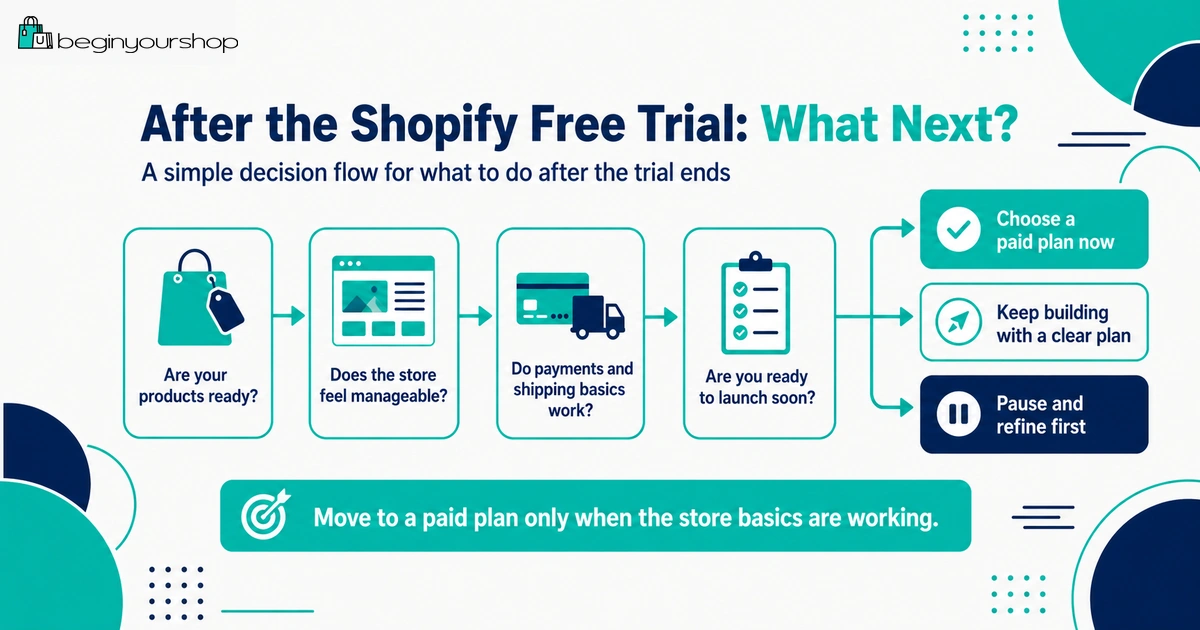
When your Shopify free trial ends, you need to decide whether to choose a paid plan, continue with any available promotional pricing, pause the project, or stop using the store. If you do not choose a pricing plan during the free trial, Shopify says your account is frozen at the end of the trial.
This beginner-friendly article explains what happens after the Shopify free trial ends, what you should review before choosing a plan, what usually changes after the trial, and how to avoid paying for a store that is not ready to launch.
The end of the Shopify free trial is an important decision point. It is where your store moves from exploration to commitment.
During the trial, you can explore Shopify, add products, try themes, draft pages, review settings, and decide whether the platform fits your store idea. But after the trial ends, you need to decide whether to choose a paid plan and continue building, prepare for launch, or pause the project.
Beginners often make one of two mistakes at this point:
- They choose a plan too quickly because the trial is ending, even though the store is not ready.
- They let the trial expire without understanding what happens next or what they should have checked first.
This guide explains what happens after your Shopify free trial ends and how to make a practical next decision.
Last checked: May 29, 2026. Shopify free trial length, promotional pricing, plan names, checkout access, account status, and payment testing rules can change. Always confirm current details on Shopify’s official free trial page and in your Shopify admin before choosing a plan.

Quick Answer
After your Shopify free trial ends, you generally need to choose a paid plan to continue using Shopify as a live ecommerce store. If you do not choose a pricing plan during the trial, Shopify says your account is frozen at the end of the trial. If you are ready to launch, choose a suitable plan, complete payment setup, test checkout, review shipping and policies, connect your domain, and remove the storefront password when the store is ready.
If you are ready
Choose a plan, test checkout, confirm payments and shipping, and prepare the store for launch.
If you are not ready
Pause and fix the basics before paying for a store that cannot sell properly.
Best decision rule
Do not choose a plan only because the trial is ending. Choose it because the store is ready for the next stage.
What Happens When the Trial Ends?
Shopify’s free trial is designed to let you explore Shopify before committing to a monthly plan. The free trial begins when you first sign up, not when you start working on the store.
When the trial period ends, there are usually two practical outcomes:
- You choose a paid plan and continue building or launch your store.
- You do not choose a plan, and the account is frozen at the end of the free trial.
Shopify’s pricing plans FAQ states that if you do not choose a pricing plan during your free trial, your account will be frozen at the end of the trial.
This means you should not treat the final trial day as a surprise. Use the trial period to decide whether the store is ready for a paid plan.
If You Choose a Paid Plan
If you choose a paid plan after or during the trial, you can continue working on the store and move toward a real launch.
Choosing a paid plan may allow you to:
- Continue using the Shopify admin
- Prepare the store for public launch
- Activate checkout for online store purchases
- Remove the storefront password when ready
- Test payment gateways where supported
- Use the store as a real selling channel
However, choosing a plan does not automatically mean your store is ready. You still need to review payments, shipping, taxes, policies, product pages, mobile layout, order notifications, domain, and checkout flow.
What choosing a plan does not solve
A paid plan does not fix:
- Weak product descriptions
- Poor product images
- Unclear shipping rules
- Missing policies
- Unclear product positioning
- No traffic plan
- Bad mobile layout
- Unfinished checkout testing
Think of the paid plan as unlocking the next stage. It is not a substitute for proper launch preparation.
If You Do Not Choose a Plan
If you do not choose a pricing plan during the free trial, Shopify says your account is frozen at the end of the trial. Shopify also says that if you end your account within the free trial period without choosing a paid plan, no additional action is required.
For beginners, this is important because it means you should decide intentionally. If the store idea is not ready, pausing can be better than paying too early.
Reasons not to choose a plan yet
- You are still unsure what to sell.
- You have not added real products.
- Product pages are incomplete.
- You have not reviewed payment options.
- Shipping costs or rules are unclear.
- You do not know your first traffic channel.
- The store still depends on too many unfinished tasks.
There is no benefit in paying for a store that cannot sell, cannot fulfill orders, or cannot explain its offer clearly.
How Promotional Pricing Fits In
Shopify may offer promotional pricing after the free trial. Shopify’s official free trial offer page currently promotes starting for free and then continuing for $1/month for a promotional period, but offers can vary by country, time, eligibility, and current Shopify terms.
Promotional pricing can be useful because it gives beginners more time to keep building at a lower initial monthly cost. But it should not make you ignore the real costs of running a store.
Promotional pricing can help with:
- Continuing store setup after the trial
- Testing products and theme structure
- Preparing pages, policies, and navigation
- Reviewing payment and shipping settings
- Building a launch plan before full monthly pricing begins
Promotional pricing does not remove:
- Payment processing fees
- Domain costs
- Paid app costs
- Theme costs if you buy a paid theme
- Product sample costs
- Inventory costs
- Packaging and shipping costs
- Marketing costs
Use promotional pricing as extra setup time, not as a reason to delay important decisions.
What to Check Before Paying
Before choosing a Shopify plan, review the parts of the store that affect whether customers can actually buy and receive products.
Store readiness questions
- Have I added real products?
- Are product titles and descriptions clear?
- Do product images look trustworthy?
- Are variants, prices, and inventory correct?
- Have I chosen a theme that fits my product type?
- Does the store work on mobile?
- Have I drafted shipping and return policies?
- Have I reviewed payment provider options?
- Have I reviewed shipping zones and rates?
- Do I know the real startup costs after the trial?
- Do I know how I will get my first visitors?
If too many answers are “no,” the store probably needs more preparation before you pay to continue.
What should be ready before launch?
| Area | Minimum launch standard |
|---|---|
| Products | Clear titles, descriptions, images, prices, variants, inventory, and shipping details. |
| Theme | Homepage, product pages, collections, cart, footer, and mobile layout are usable. |
| Payments | Payment provider is available, configured, verified where required, and ready for real orders. |
| Shipping | Shipping zones, rates, product weights, fulfillment locations, and policies are reviewed. |
| Policies | Shipping, return, refund, privacy, terms, and contact pages are published and linked. |
| Checkout | Checkout can be tested, and order notifications behave as expected. |
| Traffic | You have at least one realistic plan to bring visitors after launch. |
Payments, Checkout, and Test Orders
One of the biggest changes after choosing a paid plan is that you can move closer to real checkout testing and launch readiness.
Shopify’s test order documentation says you can test a payment gateway only after choosing a paid plan. Shopify also recommends placing at least one test order during store setup or whenever payment settings change.
After choosing a plan, test:
- Payment provider setup
- Test mode if supported
- Checkout flow
- Shipping rates at checkout
- Tax display where applicable
- Discount codes
- Order confirmation emails
- Inventory changes after order placement
- Refund or cancellation workflow where appropriate
Do not launch without testing checkout. A broken checkout or missing shipping rate can turn interested visitors into lost customers.
Important: If payment test mode is active, real payments might not be captured. Always turn off test mode before accepting real customer orders.
Storefront Password and Launch Access
During a free trial, your Shopify store usually starts with either a storefront password or inactive checkout. Shopify’s free trial documentation explains that to let customers purchase products, you can remove the storefront password or activate online store checkout by choosing a paid plan.
Shopify’s launch preparation documentation also says that if you are ready to launch during your free trial, you need to choose a subscription plan to remove your online store password.
Before removing the password
Review:
- Products
- Collections
- Homepage
- Navigation
- Footer links
- Policies
- Contact page
- Payments
- Shipping
- Checkout
- Mobile layout
- Domain
Removing the password makes the store accessible to visitors. Do it when the store is ready to be judged by real customers.
How to Choose the Right Plan
Beginners often worry about choosing the “perfect” Shopify plan. In most cases, you should start with the lowest plan that fits your actual needs, then upgrade later if the business grows.
Plan selection questions
- How many staff users do I need?
- What reports do I need?
- Am I selling only online, or also in person?
- Do I need more advanced international selling features?
- Do lower payment rates on higher plans justify the extra monthly cost?
- Am I ready for real orders, or still preparing?
Do not choose a higher plan because it sounds more professional. Choose a plan based on features, costs, and actual business requirements.
Beginner plan rule
Start simple. If your store is new and your needs are basic, begin with the lowest suitable plan and upgrade only when sales volume, reporting needs, staff needs, or operations justify it.
Costs to Expect After the Trial
The Shopify plan is only one part of the total cost. After the trial, your real store budget may include several other costs.
Common costs after the trial
- Shopify plan subscription
- Domain name
- Payment processing fees
- Third-party transaction fees if using outside payment providers
- Paid apps
- Paid theme if used
- Product samples
- Inventory
- Packaging
- Shipping supplies
- Email marketing tools
- Advertising or content creation
- Legal, tax, or admin costs depending on your business
Before choosing a plan, estimate your first 30 to 90 days of costs. This prevents the common mistake of focusing only on the subscription price.
What If Your Store Is Not Ready?
If the trial is ending but the store is not ready, do not panic. You have several practical options.
Option 1: Choose a plan and keep building
This can make sense if the store is close to ready, the promotional pricing is acceptable, and you know exactly what remains to be done.
Option 2: Pause and improve your plan
This can make sense if the product idea, shipping model, payment setup, or traffic plan is still unclear.
Option 3: Start again later with better preparation
This can make sense if you used the trial mainly to learn Shopify and now realize you need better product information, images, budget, or strategy.
Signs you should not pay yet
- You have not added real products.
- You are still unsure what the store sells.
- You cannot explain your target customer.
- Payment options are unresolved.
- Shipping costs make the business unrealistic.
- You need many paid apps before proving demand.
- You have no idea how to attract visitors.
Paying for Shopify should move a ready project forward. It should not be used to avoid making hard decisions.
Before-You-Pay Checklist
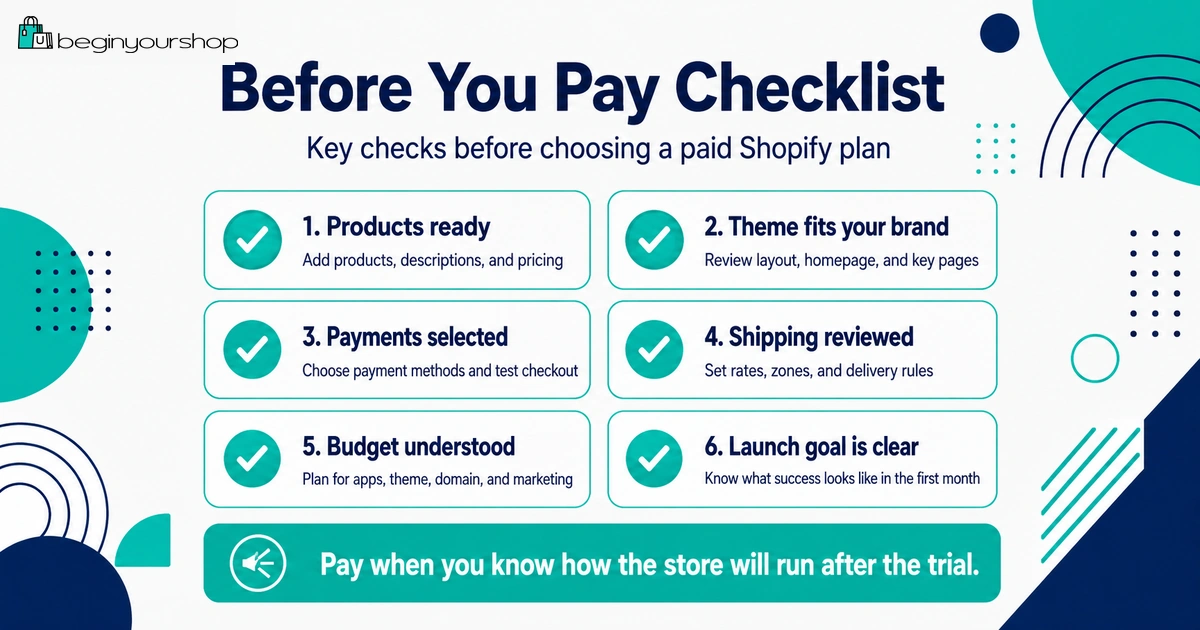
Use this checklist before choosing a paid plan.
| Question | Ready? |
|---|---|
| I have added real products with clear titles, descriptions, images, and prices. | Yes / No |
| I understand which Shopify plan I need and why. | Yes / No |
| I know whether Shopify Payments or another provider works for my store. | Yes / No |
| I understand payment processing and possible transaction fees. | Yes / No |
| I know where I ship and how rates will be calculated. | Yes / No |
| I have drafted shipping, return, refund, privacy, and terms pages. | Yes / No |
| I have checked the store on mobile. | Yes / No |
| I know which apps are truly required. | Yes / No |
| I have estimated the first 30 to 90 days of costs. | Yes / No |
| I have a realistic traffic plan for after launch. | Yes / No |
If most answers are “no,” use more preparation time before committing. If most answers are “yes,” choosing a plan may be a reasonable next step.
First Week After Choosing a Plan
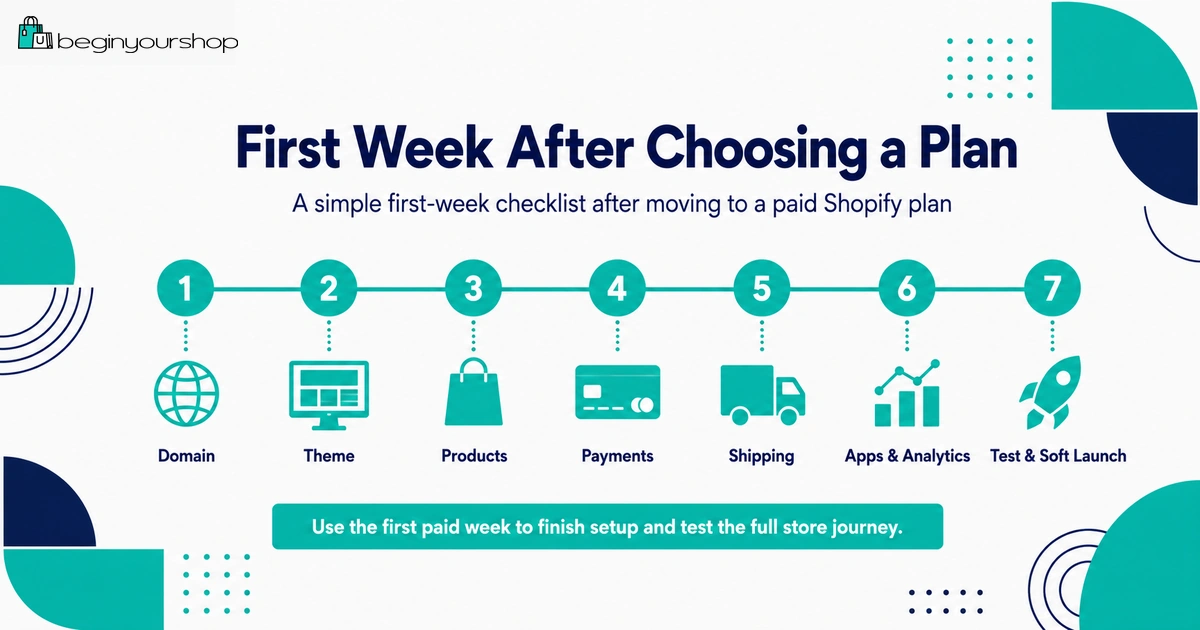
After choosing a plan, do not immediately start advertising. Use the first paid week to confirm that the store is operational.
Day 1: Confirm billing, plan, and payments
- Confirm the selected plan.
- Review billing settings.
- Complete payment provider setup.
- Confirm verification requirements.
- Review payout settings.
Day 2: Test checkout
- Activate test mode if appropriate.
- Place a test order.
- Check shipping rates.
- Check taxes.
- Check order confirmation emails.
- Turn off test mode before real launch.
Day 3: Review products and policies
- Review product pages.
- Check variants and inventory.
- Review shipping and return policies.
- Confirm policy links are in the footer.
Day 4: Check domain and mobile experience
- Connect or confirm custom domain.
- Test the store in a private browser window.
- Review mobile menu, product pages, cart, and checkout.
Day 5: Prepare launch traffic
- Choose one traffic channel.
- Prepare launch content or emails.
- Check analytics setup.
- Confirm support inbox works.
The first paid week should reduce risk. Do not use it only for more design changes.
Common Mistakes After the Trial
Mistake 1: Choosing a plan only because the trial is ending
Choose a plan when you understand why you need it and what you will do next.
Mistake 2: Ignoring checkout testing
Checkout testing is essential. Do not assume payments, shipping, and notifications work just because the store looks good.
Mistake 3: Forgetting the real cost of apps
Apps can quickly increase monthly costs. Keep only the apps you actually need.
Mistake 4: Removing the storefront password too early
Make sure the store is ready before making it public.
Mistake 5: Not understanding payment fees
Payment processing fees and third-party transaction fees can affect your margins.
Mistake 6: Starting paid ads before the store is ready
Paid traffic can waste money if product pages, checkout, shipping, and trust pages are weak.
Mistake 7: Forgetting to review mobile
Many shoppers browse from phones. Always test mobile before launch.
Decision Table: What Should You Do After the Trial?
| Your situation | Best next step |
|---|---|
| You added products, reviewed payments, checked shipping, and have a launch plan. | Choose a suitable paid plan and prepare for launch testing. |
| Your product pages are incomplete, but the business idea is clear. | Consider continuing only if promotional pricing gives you useful setup time. |
| You are unsure what to sell. | Pause and clarify product strategy before paying. |
| Shipping or payment setup does not work for your business model. | Fix the operational issue before choosing a plan. |
| You need many paid apps before proving demand. | Reconsider the business model or simplify the launch version. |
| You want to launch ads immediately but have not tested checkout. | Do not advertise yet. Test checkout and operational readiness first. |
FAQ
What happens when my Shopify free trial ends?
If you do not choose a pricing plan during your free trial, Shopify says your account is frozen at the end of the trial. If you choose a paid plan, you can continue building and move toward launch.
Do I have to choose a paid plan after the free trial?
You need to choose a paid plan if you want to continue using Shopify as an active store and move toward public selling. If you do not want to continue, you can let the trial end without choosing a plan.
Will Shopify charge me automatically after the free trial?
Shopify’s free trial documentation says that if you end your account within the free trial period without choosing a paid plan, no additional action is required. Always review current billing terms and your account status in your Shopify admin.
Can I keep building after the trial?
Yes, if you choose a paid plan or an eligible promotional pricing option available to your account. If you do not choose a plan, the account can be frozen at the end of the trial.
Can I launch my store during the free trial?
Shopify’s launch preparation documentation says that if you are ready to launch during your free trial, you need to choose a subscription plan to remove your online store password.
Can I test payments before choosing a paid plan?
Shopify’s test order documentation says you can test a payment gateway only after choosing a paid plan.
Should I choose a paid plan if my store is not ready?
Not necessarily. If products, payments, shipping, policies, checkout, and traffic plan are not ready, it may be better to pause and fix the business setup first.
Which Shopify plan should beginners choose?
Most beginners should choose the lowest plan that supports their actual needs. Upgrade later when sales volume, staff needs, reports, or business complexity justify it.
Does promotional pricing mean Shopify is free?
No. Promotional pricing may reduce the subscription cost temporarily, but you may still have other costs such as payment fees, domain, apps, theme, products, shipping, and marketing.
What should I do immediately after choosing a plan?
Review billing, complete payment setup, test checkout, review shipping, check policies, connect your domain, test mobile layout, and prepare your first traffic channel.
Final Thoughts
The end of the Shopify free trial is not just a billing moment. It is a decision point.
If your products, store structure, payment setup, shipping rules, policies, mobile experience, and launch plan are ready, choosing a paid plan can be the right next step. If those basics are still unclear, paying too early can create unnecessary cost without solving the real problem.
Use the trial to learn and test. Use the paid plan when you are ready to continue seriously. A thoughtful decision after the trial is better than rushing into a store that is not ready to sell.
Next recommended guide: Shopify Free Trial Explained for Beginners